Basic React
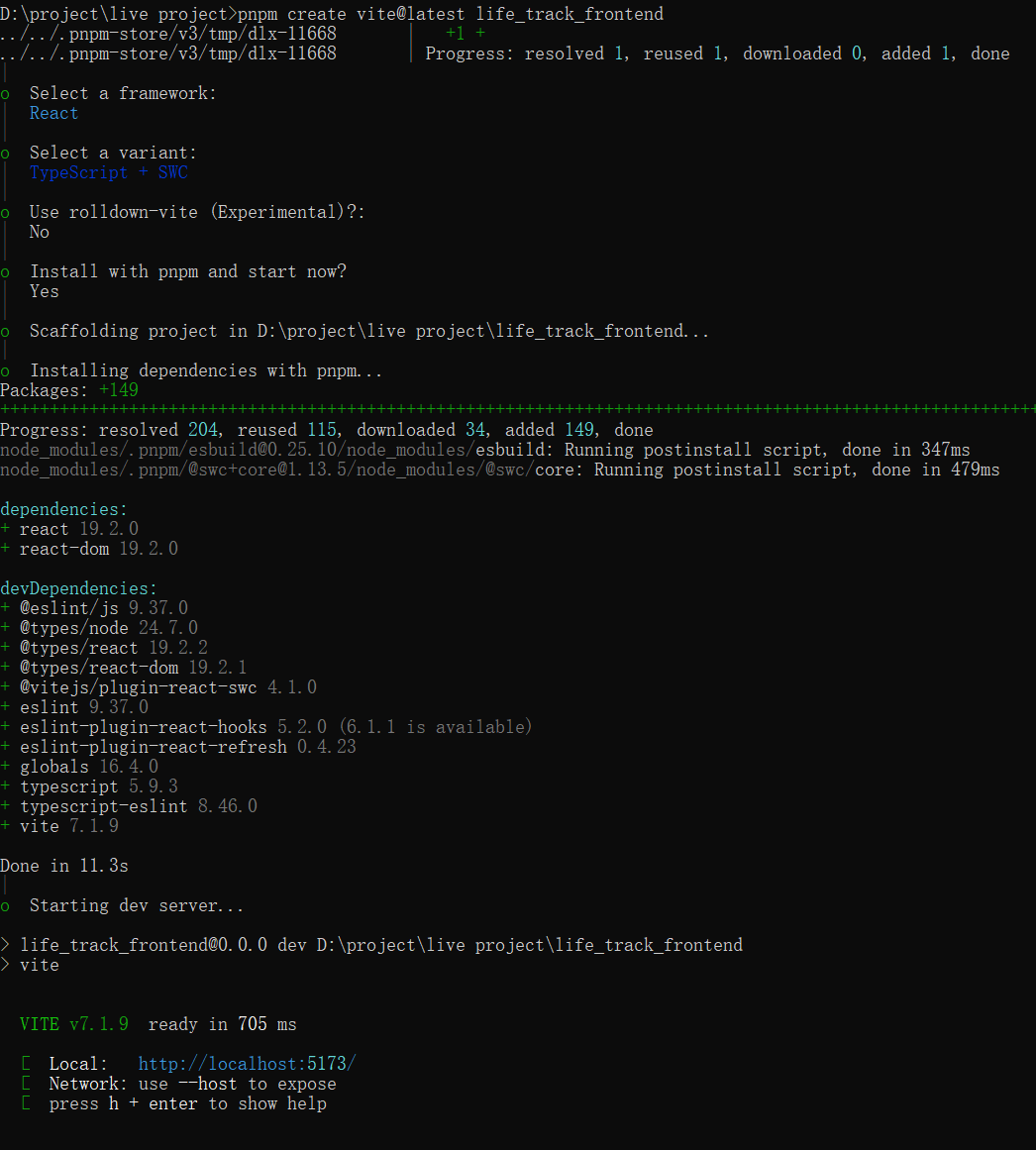
Create React Project
npm create vite@latest my-react-app

cd my-react-app
npm install
npm run dev
Spread and Destructuring Array or Object
- Spread array
const arr = [1, 2, 3];
const copy = [...arr];
console.log(copy); // [1, 2, 3]
- Spread object
const obj = { a: 1, b: 2 };
const copy = { ...obj };
console.log(copy); // { a: 1, b: 2 }
- Array destructuring
const [a, b] = [10, 20];
console.log(a); // 10
console.log(b); // 20
- Object destructuring
const person = { name: "Alice", age: 25 };
const { name, age } = person;
console.log(name, age); // Alice 25
Updating a Nested Object
Consider the object construct like this,
const [person, setPerson] = useState({
  name: 'Niki de Saint Phalle',
  artwork: {
    title: 'Blue Nana',
    city: 'Hamburg',
    image: 'https://i.imgur.com/Sd1AgUOm.jpg',
  }
});
You can update immutable object like this way,
const nextArtwork = { ...person.artwork, city: 'New Delhi' };
const nextPerson = { ...person, artwork: nextArtwork };
setPerson(nextPerson);
or
setPerson({
  ...person, // Copy other fields
  artwork: { // but replace the artwork
    ...person.artwork, // with the same one
    city: 'New Delhi' // but in New Delhi!
  }
});
or use useImmer instead of useState
Another way you can use
use-immerlibrary, handle deeper nested object.
  const [person, updatePerson] = useImmer({
    name: 'Niki de Saint Phalle',
    artwork: {
      title: 'Blue Nana',
      city: 'Hamburg',
      image: 'https://i.imgur.com/Sd1AgUOm.jpg',
    }
  });

  function handleNameChange(e) {
    updatePerson(draft => {
      draft.name = e.target.value;
    });
  }
Arrow Functions
| Syntax | Meaning | Need return? |
|---|---|---|
(param) => ( expression ) | Implicit return, automatically returns the result of the expression in parentheses | ❌ No |
(param) => { statement } | Block statement, does not automatically return, need to manually write return | ✅ Yes |
React Data Iteration and Key
key can only be used on the element in the parent component's map rendering list, not inside the child component.
export default function Contact({
  img,
  imgAlt,
  name,
  phoneNumber,
  email,
}: ContactInfo) {
  return (
    // This is wrong, because key can only be used on
    // the element in the parent component's map rendering list,
    // not inside the child component.
    // <article className="contact-card" key={id}>
    <article className="contact-card">
      <img src={img} alt={imgAlt} />
      <h3>{name}</h3>
      <div className="info-group">
        <img src={phoneIcon} alt="phone icon" />
        <p>{phoneNumber}</p>
      </div>
      <div className="info-group">
        <img src={mailIcon} alt="mail icon" />
        <p>{email}</p>
      </div>
    </article>
  );
}
function App() {
  return (
    <div className="contacts">
      {contacts.map((contact) => (
        <Contact key={contact.id} {...contact} />
      ))}
    </div>
  );
}
Passing Parameters to React Components
import phoneIcon from "./images/phone-icon.png";
import mailIcon from "./images/mail-icon.png";
import type ContactInfo from "./ContactInfo";

export default function Contact({
  img,
  imgAlt,
  name,
  phoneNumber,
  email,
}: ContactInfo) {
  return (
    // This is wrong, because key can only be used on
    // the element in the parent component's map rendering list,
    // not inside the child component.
    // <article className="contact-card" key={id}>
    <article className="contact-card">
      <img src={img} alt={imgAlt} />
      <h3>{name}</h3>
      <div className="info-group">
        <img src={phoneIcon} alt="phone icon" />
        <p>{phoneNumber}</p>
      </div>
      <div className="info-group">
        <img src={mailIcon} alt="mail icon" />
        <p>{email}</p>
      </div>
    </article>
  );
}
import "./index.css";
import Contact from "./Contact";
import { contacts } from "./ContactInfo";
function App() {
  return (
    <div className="contacts">
      {contacts.map((contact) => (
        <Contact key={contact.id} {...contact} />
      ))}
    </div>
  );
}
export default App;
useState Function
import { useState } from "react";

export default function Main() {
  // Array destructuring
  const [ingredients, setIngredients] = useState<string[]>([
    "Chicken",
    "Oregano",
    "Tomatoes",
  ]);
  const handleSubmit: React.FormEventHandler<HTMLFormElement> = (event) => {
    event.preventDefault();
    const formData = new FormData(event.currentTarget);
    // the key is the name of input
    const newIngredient = formData.get("ingredient");
    if (typeof newIngredient === "string" && newIngredient?.trim() !== "") {
      setIngredients((prev) => [...prev, newIngredient]);
    } else {
      console.warn("No ingredient provided");
    }
  };

  return (
    <main>
      <form className="add-ingredient-form" onSubmit={handleSubmit}>
        <input
          type="text"
          name="ingredient"
          aria-label="Add ingredient"
          placeholder="e.g. oregano"
        ></input>
        <button>Add ingredient</button>
      </form>
      <h1>Ingrredients on hand:</h1>
      <ul className="ingredient-ul">
        {ingredients.map((ingredient) => (
          <li key={ingredient}>{ingredient}</li>
        ))}
      </ul>
    </main>
  );
}
onClick: Function Name vs Anonymous Function
Version 1 (onClick={getRecipe})
You’re giving React a function reference. React will call getRecipe() only when the button is clicked.
This is the simplest and most efficient form — no new function is created on every render.
Version 2 (onClick={() => getRecipe()})
You’re creating a new anonymous function on each render that calls getRecipe() inside it.
It still works — React will call your wrapper function on click, which in turn calls getRecipe() — but it’s one extra layer of indirection and (very slightly) less efficient.
| Code | When to use | Notes |
|---|---|---|
onClick={changeToHeld} | Default, most common, or closure function | Pass function directly |
onClick={() => changeToHeld(id)} | When you need to wrap logic or pass arguments | Creates a new function every render |
Pass Parameter Function
import React, { useState } from "react";
import "./index.css";
import Die from "./Die";
import { nanoid } from "nanoid/non-secure";

export interface DiceProp {
  value: number;
  isHeld: boolean;
  id: string;
}

const App: React.FC = () => {
  const generateDice = () =>
    Array.from({ length: 10 }, () => ({
      value: Math.ceil(Math.random() * 6),
      isHeld: false,
      id: nanoid(),
    }));
  const [dice, setDice] = useState<DiceProp[]>(generateDice());
  const changeToHeld = (id: string) =>
    setDice((prevDice) =>
      prevDice.map((die) => (die.id === id ? { ...die, isHeld: true } : die))
    );
  const diceElements = dice.map((diceProp) => (
    <Die key={diceProp.id} changeToHeld={changeToHeld} die={diceProp} />
  ));

  const rollDice = () => {
    setDice(generateDice());
  };

  return (
    <main>
      <div className="dice-container">{diceElements}</div>
      <button className="roll-button" onClick={rollDice}>
        Roll
      </button>
    </main>
  );
};

export default App;
import type { DiceProp } from "./App";

/**
 * Recommendation
 * For scalable apps / larger state management: Option 1 is preferred
 * because it separates state (data) from behavior (actions), which aligns with React best practices.
 */
const Die: React.FC<{ die: DiceProp; changeToHeld: (id: string) => void }> = ({
  die,
  changeToHeld,
}) => {
  const { value, isHeld, id } = die;
  return (
    <button
      className={isHeld ? "held" : "notHeld"}
      onClick={() => changeToHeld(id)}
    >
      {value}
    </button>
  );
};

export default Die;
Pass a Closure Function
import React, { useState } from "react";
import "./index.css";
import Die from "./Die";
import { nanoid } from "nanoid/non-secure";

export interface DiceProp {
  value: number;
  isHeld: boolean;
  id: string;
}

const App: React.FC = () => {
  const generateDice = () =>
    Array.from({ length: 10 }, () => ({
      value: Math.ceil(Math.random() * 6),
      isHeld: false,
      id: nanoid(),
    }));
  const [dice, setDice] = useState<DiceProp[]>(generateDice());
  const changeToHeld = (id: string) =>
    setDice((prevDice) =>
      prevDice.map((die) => (die.id === id ? { ...die, isHeld: true } : die))
    );

  const diceElements = dice.map((diceProp) => (
    <Die
      key={diceProp.id}
      // closure function
      changeToHeld={() => changeToHeld(diceProp.id)}
      die={diceProp}
    />
  ));

  const rollDice = () => {
    setDice(generateDice());
  };

  return (
    <main>
      <div className="dice-container">{diceElements}</div>
      <button className="roll-button" onClick={rollDice}>
        Roll
      </button>
    </main>
  );
};

export default App;
import type { DiceProp } from "./App";

const Die: React.FC<{ die: DiceProp; changeToHeld: () => void }> = ({
  die,
  changeToHeld,
}) => {
  const { value, isHeld } = die;
  return (
    <button className={isHeld ? "held" : "notHeld"} onClick={changeToHeld}>
      {value}
    </button>
  );
};

export default Die;
How to Dynamically Set Variable Name as Key
const handleChange = (event: React.ChangeEvent<HTMLInputElement>) => {
  const { name, value } = event.currentTarget;
  setMeme((prev) => ({ ...prev, name: value }));
};
const handleChange = (event: React.ChangeEvent<HTMLInputElement>) => {
  const { name, value } = event.currentTarget;
  setMeme((prev) => ({ ...prev, [name]: value }));
};
Types Renderable in TSX
In React JSX expressions { ... }, only the following types can be rendered directly:
- String (string)
- Number (number)
- Boolean (boolean)
- React Element (JSX Element)
- Array (containing the above types)
- Cannot render Objects, Object Arrays
useEffect Function
When calling useEffect, depends on the dependents in [].
That's look this example.
import React from "react";

export default function App() {
  const [starWarsData, setStarWarsData] = React.useState({});
  const [count, setCount] = React.useState(0);

  console.log("Rendered!");

  React.useEffect(() => {
    console.log("useEffect runs");
    fetch("https://swapi.dev/api/people/1")
      .then((res) => res.json())
      .then((data) => setStarWarsData(data)
      );
  }, [starWarsData]);

  return (
    <div>
      <h2>The count is {count}</h2>
      <button onClick={() => setCount((prevCount) => prevCount + 1)}>
        Add
      </button>
      <pre>{JSON.stringify(starWarsData, null, 2)}</pre>
    </div>
  );
}
Each time setStarWarsData(data) runs, React receives a new { ... } object.
Even if the JSON content is identical, it’s a different object reference,
so React thinks the dependency changed and re-runs the effect — causing an infinite loop.
correct usage
React.useEffect(() => {
  console.log("useEffect runs");
  fetch("https://swapi.dev/api/people/1")
    .then((res) => res.json())
    .then((data) =>
      setStarWarsData(data)
    );
}, []);
What happens when visit the page first time?
Rendered!
App.tsx:11 useEffect runs
App.tsx:8 Rendered!
| Stage | Trigger | What happens | Console output |
|---|---|---|---|
| 1 | Initial mount | Component function executes | Rendered! |
| 2 | After mount | useEffect callback runs | useEffect runs |
| 3 | State updated | Component re-renders with new data | Rendered! |
useRef
import { useRef } from "react";
export default function FocusInput() {
  const inputRef = useRef<HTMLInputElement>(null);

  const handleFocus = () => {
    // current might be null, so check for non-null
    if (inputRef.current) {
      inputRef.current.focus();
    }
  };

  return (
    <div>
      <input ref={inputRef} type="text" placeholder="Click the button to focus me" />
      <button onClick={handleFocus}>Focus Input</button>
    </div>
  );
}
How to Clean Up Resources in useEffect
import { useEffect, useState } from "react";

export default function WindowTracker() {
  const [windowWidth, setWindownWidth] = useState<number>(window.innerWidth);
  useEffect(() => {
    const watchWindowWidth = () => {
      console.log("resized!");
      setWindownWidth(window.innerWidth);
    };
    window.addEventListener("resize", watchWindowWidth);
    // cleaning up what creating before
    return () => {
      window.removeEventListener("resize", watchWindowWidth);
      console.log("cleaning up");
    };
  }, []);
  return <h1>Window width: {windowWidth}</h1>;
}
Array.from
// The _ means: “Ignore the element, just use the index.”
Array.from({ length: 3 }, (_, i) => i * 2);
// → [0, 2, 4]
When no parameters are needed, just don't write them.
Array.from({ length: 10 }, () => Math.ceil(Math.random() * 6))
Array.every
array.every(callback(element, index, array), thisArg?)
- With callback only
const threshold = { limit: 10 };
const numbers = [3, 5, 9];

// Arrow functions do NOT bind `this`, so `thisArg` is ignored.
const allBelowLimit = numbers.every((num) => num <br threshold.limit);

console.log(allBelowLimit); // true
- With callback and thisArg
const threshold = 5;
const numbers = [6, 7, 8, 9, 10];
const allAboveThreshold = numbers.every(function (num) {
  return num > this.threshold;
}, { threshold });
console.log(allAboveThreshold); // true
Lazy Initialization for useState
1️⃣ Lazy initialization: useState(() => generateDice())
- Here, you pass a function to useState.
- React will call that function once — only on the initial render.
- The return value of the function becomes the initial state.
- After that, React never calls the function again, because it already has the state stored internally.
- Benefit: Useful when computing the initial state is expensive.
Explain:
- Component mounts → React calls () => generateDice().
- The return value (DiceProp[]) is stored as the state.
- Component re-renders → React reuses the stored state, function is never called again.
2️⃣ Non-lazy way:
const [dice, setDice] = useState(generateDice());
- Here, you call generateDice() immediately and pass its return value to useState.
- This happens every render of the component, but only the first value matters for initialization.
Explain:
- Component renders → generateDice() runs → returns array → React stores as state.
- Component re-renders later → generateDice() still runs, but React ignores it, because the state is already managed internally.
- Problem: If generateDice() is expensive, you waste CPU calling it unnecessarily on every render.
Reusable Routes
Xml
import { Route, Routes } from "react-router-dom";
import GamesId from "./GamesId";
import GameLayout from "./GameLayout";

// this contains links and routes
// 1. move all sub Route
// 2. wrapper all routes in to a "<Route element={<GameLayout />}></Route>"
// this part of code equivalent to "src/routes/v4/gameRoutes.tsx"
export default function GameRoutes() {
  return (
    <>
      {/* <GameLayout /> */}
      <Routes>
        <Route element={<GameLayout />}>
          <Route index element={<h1>Games</h1>}></Route>
          <Route path=":id" element={<GamesId />}></Route>
          <Route path="search" element={<h1>games search</h1>}></Route>
        </Route>
      </Routes>
    </>
  );
}
import { Link, Route, Routes } from "react-router-dom";
import NotFoundPage from "../other-function/NotFoundPage";
import GameRoutes from "./GameRoutes";
import GamesHome from "./GamesHome";

export default function App() {
  return (
    <>
      <nav
        style={{
          display: "flex",
          flexDirection: "column",
        }}
      >
        {/* if using replace here, backward will be two pages instead of one page */}
        <Link to="/" replace>
          home
        </Link>
        <Link to="/games">games</Link>
      </nav>
      <Routes>
        <Route path="/" element={<GamesHome />}></Route>
        {/* must "/*"" after "/games" */}
        <Route path="/games/*" element={<GameRoutes />}></Route>
        <Route path="*" element={<NotFoundPage />}></Route>
      </Routes>
    </>
  );
}
Json
import type { RouteObject } from "react-router-dom";
import GameLayout from "./GameLayout";
import GameItem from "./GameItem";
/**
 * reusable links and routes in gameRoutes,
 * - index
 * - index > {id}
 * - index > description
 */
const gameRoutes: RouteObject = {
  element: <GameLayout />,
  children: [
    { index: true, element: <h1>games</h1> },
    { path: ":id", element: <GameItem /> },
    {
      path: "description",
      element: (
        <p>
          PUBG is a last-player-standing shooter where up to 100 players
          parachute onto an island, scavenge for weapons and equipment, and
          fight to be the sole survivor. The playable area continuously shrinks
          throughout the match, forcing players into closer combat.
        </p>
      ),
    },
  ],
};

export default gameRoutes;
import type { RouteObject } from "react-router-dom";

import gameRoutes from "./gameRoutes";

// equivalent to <Routes>...</Routes>
export const routes: RouteObject[] = [
  {
    path: "/",
    element: <h1>home</h1>,
  },
  {
    path: "/games",
    // nested layout links here, need Layout inside of it.
    /* element: <GameLayout />,
    children: [
      { index: true, element: <h1>games</h1> },
      { path: ":id", element: <GameItem /> },
      { path: "search", element: <h1>games search</h1> },
    ], */
    // reuse code from gameRoutes
    ...gameRoutes,
  },
  {
    path: "/games1",
    ...gameRoutes,
  },
];
- Attribution: Retain the original author's signature and code source information in the original and derivative code.
- Preserve License: Retain the Apache 2.0 license file in the original and derivative code.
- Attribution: Give appropriate credit, provide a link to the license, and indicate if changes were made.
- NonCommercial: You may not use the material for commercial purposes. For commercial use, please contact the author.
- ShareAlike: If you remix, transform, or build upon the material, you must distribute your contributions under the same license as the original.