How to Integrate Husky, Prettier, etc. in a Vue Project?
Create Project using Vite
pnpm create vite-app vue3-ts
Install Dependencies
pnpm install husky lint-staged eslint prettier -D
Configure Prettier
// .prettierrc.json
{
  "singleQuote": true,
  "semi": true,
  "printWidth": 100,
  "trailingComma": "all",
  "endOfLine": "auto"
}
You can use pnpx prettier --write . command to format code.
Configure ESLint
# Initialize ESLint
pnpm create @eslint/config
The following options are optional, you can choose the same configuration as mine.
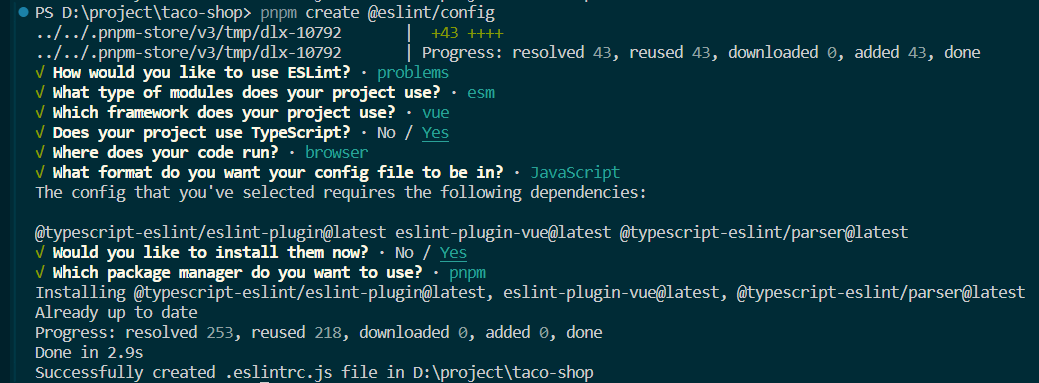
Run command pnpx eslint . to check ESLint rules;
Install and Configure Husky
# Initialize husky
pnpm husky install
# Configure husky
pnpx husky add .husky/pre-commit "pnpm lint-staged"
After executing the above commands, your project structure will be as follows, a .husky directory and a pre-commit file will be automatically created.

Wait, another configuration is needed.
// package.json
  "scripts": {
    "lint": "eslint . --ext .vue,.js,.jsx,.cjs,.mjs,.ts,.tsx,.cts,.mts --fix --ignore-path .gitignore",
    "prepare": "husky install",
    "lint-staged": "lint-staged"
  },
 "lint-staged": {
    "*.{js,ts,vue}": [
      "eslint --fix"
    ]
  },
Verify Husky
Run the following commands to submit some files
git add .

git commit -m 'test for husky'
You will see the following in the console:
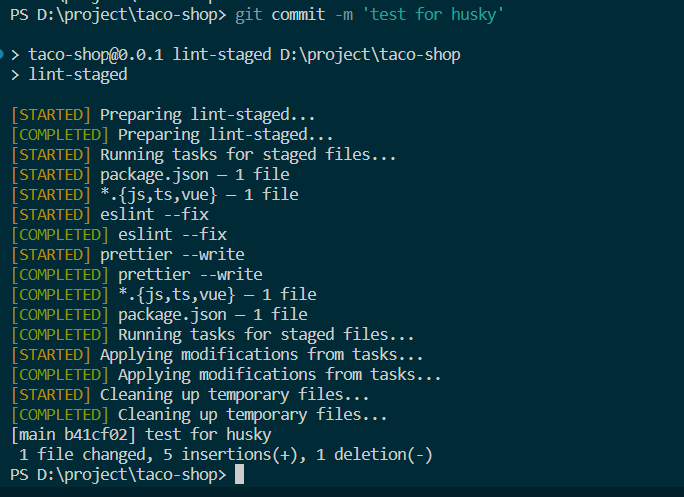
Congratulations, you successfully triggered lint-staged using git commit.
This includes ESLint fixing code and Prettier formatting code.
Conclusion
Thank you for your time, if you learned something from my article, please give me a thumbs up, meanwhile, if you have any questions, feel free to ask.
- Attribution: Retain the original author's signature and code source information in the original and derivative code.
- Preserve License: Retain the Apache 2.0 license file in the original and derivative code.
- Attribution: Give appropriate credit, provide a link to the license, and indicate if changes were made.
- NonCommercial: You may not use the material for commercial purposes. For commercial use, please contact the author.
- ShareAlike: If you remix, transform, or build upon the material, you must distribute your contributions under the same license as the original.