Vue Basics 2
All content in this article comes from the book "Vue.js in Action"
Other Usages of v-for
- Adding Index to List Content
<div id="app">
    <ul>
        <li v-for="(book, index) in books">{{ index }} - {{ book.name }}</li>
    </ul>
</div>
<script src="https://unpkg.com/vue/dist/vue.min.js"></script>
<script>
    new Vue({
        el: '#app',
        data: {
            books: [
                {name : '《Vue.js in Action》'},
                {name : '《JavaScript: The Good Parts》'},
                {name : '《Professional JavaScript for Web Developers》'}
            ]
        }
    })
</script>
- Used on template
<div id="app">
    <ul>
        <template v-for="book in books">
            <li>Title: {{ book.name }}</li>
            <li>Author: {{ book.author }}</li>
        </template>
    </ul>
</div>
<script src="https://unpkg.com/vue/dist/vue.min.js"></script>
<script>
    new Vue({
        el: '#app',
        data: {
            books: [
                {name : '《Vue.js in Action》', author: 'Liang Hao'},
                {name : '《JavaScript: The Good Parts》', author: 'Douglas Crockford'},
                {name : '《Professional JavaScript for Web Developers》', author: 'Nicholas C.Zakas'}
            ]
        }
    })
</script>
- Used to iterate object properties
<div id="app">
    <span v-for="value in user"> {{ value }}</span>
</div>
<script src="https://unpkg.com/vue/dist/vue.min.js"></script>
<script>
    new Vue({
        el: '#app',
        data: {
            user: {
                name: 'Aresn',
                gender: 'male',
                age: 26
            }
        }
    })
</script>
- Using key and index when iterating object properties
<div id="app">
    <ul>
        <li v-for="(value, key ,index) in user">
            {{ index }} - {{ key }} : {{ value }}
        </li>
    </ul>
</div>
<script src="https://unpkg.com/vue/dist/vue.min.js"></script>
<script>
    new Vue({
        el: '#app',
        data: {
            user: {
                name: 'Aresn',
                gender: 'male',
                age: 26
            }
        }
    })
</script>
- Iterating Integers
<div id="app">
    <ul>
        <span v-for="n in 10"> {{ n }}</span>
    </ul>
</div>
<script src="https://unpkg.com/vue/dist/vue.min.js"></script>
<script>
    new Vue({
        el: '#app'
    })
</script>
Usage of filter() and push() methods
<div id="app">
    <ul>
        <template v-for="book in books">
            <li>Title: {{ book.name }}</li>
            <li>Author: {{ book.author }}</li>
        </template>
    </ul>
</div>
<script src="https://unpkg.com/vue/dist/vue.min.js"></script>
<script>
    var app = new Vue({
        el: '#app',
        data: {
            books: [
                {name : '《Vue.js in Action》', author: 'Liang Hao'},
                {name : '《JavaScript: The Good Parts》', author: 'Douglas Crockford'},
                {name : '《Professional JavaScript for Web Developers》', author: 'Nicholas C.Zakas'}
            ]
        }
    });
    app.books.push({
        name: '《CSS Secrets》',
        author:'Lea Verou'
    });
    app.books = app.books.filter( function (item) {
        return item.name.match(/JavaScript/);
    });
</script>
Vue contains a set of array mutation methods, using them to change the array will also trigger view updates:
These methods will change the view
push pop shift unshift splice sort reverseThese methods will not change the view
filter concat slice- Directly setting items via index
app.books[3]={...}- Modifying array length
app.books.length=1
Vue set method to change array element content
<div id="app">
    <ul>
        <template v-for="book in books">
            <li>Title: {{ book.name }}</li>
            <li>Author: {{ book.author }}</li>
        </template>
    </ul>
</div>
<script src="https://unpkg.com/vue/dist/vue.min.js"></script>
<script>
    var app = new Vue({
        el: '#app',
        data: {
            books: [
                {name : '《Vue.js in Action》', author: 'Liang Hao'},
                {name : '《JavaScript: The Good Parts》', author: 'Douglas Crockford'},
                {name : '《Professional JavaScript for Web Developers》', author: 'Nicholas C.Zakas'}
            ]
        }
    });

    // Vue.set(app.books, 3, {
    // 	name: '《CSS Secrets》',
    // 	author: 'Lea Verou'
    // });

    // app.$set(app.books, 3, {
    // 	name: '《CSS Secrets》',
    // 	author: 'Lea Verou'
    // });

    // splice(index, len, [item])
    // app.books.splice(3, 1, {
    // 	name: '《CSS Secrets》',
    // 	author: 'Lea Verou'
    // });

    app.books.splice(1);
</script>
If using componentization in webpack (introduced in advanced chapters), Vue is not imported by default, then you can use $set
filter and sort in computed
<div id="app">
    <ul>
        <template v-for="book in filterBooks">
            <li>Title: {{ book.name }}</li>
            <li>Author: {{ book.author }}</li>
        </template>
    </ul>

    <ul>
        <template v-for="book in sortedBooks">
            <li>Title: {{ book.name }}</li>
            <li>Author: {{ book.author }}</li>
        </template>
    </ul>
</div>
<script src="https://unpkg.com/vue/dist/vue.min.js"></script>
<script>
    var app = new Vue({
        el: '#app',
        data: {
            books: [
                {name : '《Vue.js in Action》', author: 'Liang Hao'},
                {name : '《JavaScript: The Good Parts》', author: 'Douglas Crockford'},
                {name : '《Professional JavaScript for Web Developers》', author: 'Nicholas C.Zakas'}
            ]
        },
        computed: {
            filterBooks: function (){
                return this.books.filter(function (book) {
                    return book.name.match(/JavaScript/);
                });
            },
            // a.name.length - b.name.length From short to long
            sortedBooks: function(){
                return this.books.sort(function(a, b) {
                    return b.name.length - a.name.length;
                });
            }
        }
    });

</script>
click
<div id="app">
    Click count:{{ counter }}
    <button @click="counter++">Add one</button>
</div>
<script src="https://unpkg.com/vue/dist/vue.min.js"></script>
<script>
    var app = new Vue({
        el: '#app',
        data: {
            counter: 0
        }
    });

</script>
$event
<div id="app">
    <a href="http://www.apple.com" @click="handleClick('forbid open', $event)">Open Link</a>
</div>
<script src="https://unpkg.com/vue/dist/vue.min.js"></script>
<script>
    var app = new Vue({
        el: '#app',
        methods: {
            handleClick: function (message, event) {
                event.preventDefault();
                window.alert(message);
            }
        }
    });

</script>
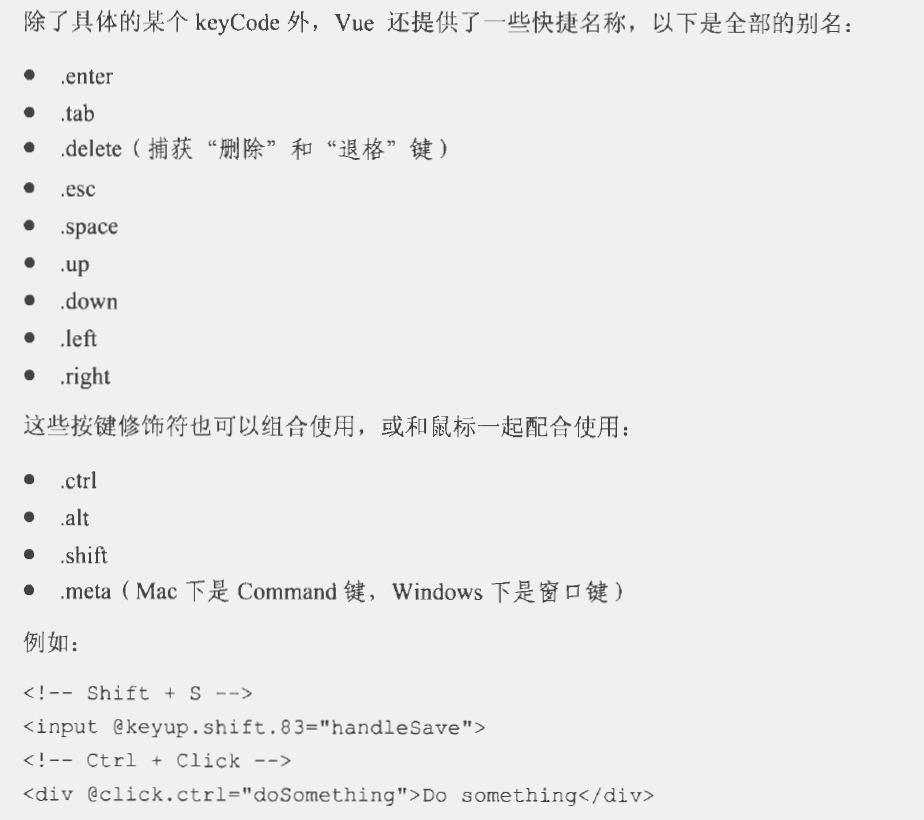
Modifiers @click.stop.prevent
<div id="app">
    <!-- stop prevents click event propagation -->
    <a href="http://www.apple.com" @click.prevent.stop="handle">Open Link</a>
    <button @submit.prevent="handle">Submit Form</button>
</div>
<script src="https://unpkg.com/vue/dist/vue.min.js"></script>
<script>
    var app = new Vue({
        el: '#app',
        methods: {
            handle: function () {
            }
        }
    });

</script>
textarea v-model
<div id="app">
    <!-- At this time, inputting pinyin letters will not trigger updates -->
    <textarea v-model="text" placeholder="Enter...">aa</textarea>
    <p>Input content is: </p>
    <!-- https://www.cnblogs.com/qianlegeqian/p/3987235.html white-space pre reference article -->
    <p style="white-space: pre">{{ text }}</p>
</div>
<script src="https://unpkg.com/vue/dist/vue.min.js"></script>
<script>
    var app = new Vue({
        el:'#app',
        data: {
            text: ''
        }
    })
</script>
@input
<div id="app">
    <!-- @input can trigger real-time updates -->
    <input type="text" @input="handleInput" placeholder="Enter...">
    <p>Input content is: {{ message }}</p>
</div>
<script src="https://unpkg.com/vue/dist/vue.min.js"></script>
<script>
    var app = new Vue({
        el:'#app',
        data: {
            message: ''
        },
        methods: {
            handleInput: function (e) {
                this.message = e.target.value;
            }
        }
    })
</script>
v-model Radio Mutually Exclusive Case
<div id="app">
    <input type="radio" v-model="picked" value="html" id="html">
    <label for="html">HTML</label>
    <br>
    <input type="radio" v-model="picked" value="js" id="js">
    <label for="js">JavaScript</label>
    <br>
    <input type="radio" v-model="picked" value="css" id="css">
    <label for="css">CSS</label>
    <br>
    <p>Selected option is: {{ picked }}</p>
</div>
<script src="https://unpkg.com/vue/dist/vue.min.js"></script>
<script>
    var app = new Vue({
        el:'#app',
        data: {
            picked: js
        }
    })
</script>
Reference: Book "Vue.js in Action"
Agreement
The code part of this work is licensed under Apache License 2.0 . You may freely modify and redistribute the code, and use it for commercial purposes, provided that you comply with the license. However, you are required to:
- Attribution: Retain the original author's signature and code source information in the original and derivative code.
- Preserve License: Retain the Apache 2.0 license file in the original and derivative code.
- Attribution: Give appropriate credit, provide a link to the license, and indicate if changes were made.
- NonCommercial: You may not use the material for commercial purposes. For commercial use, please contact the author.
- ShareAlike: If you remix, transform, or build upon the material, you must distribute your contributions under the same license as the original.