How to use Vue Router in Vue3 ts project
Prerequisite
- Install Nodejs, Official Website, recommended version
16.xxxand18.xxx; - Install pnpm, install according to the following command:
npm install -g pnpm. - Create a vite vue3 ts project, use
pnpm create vite-app my-vue3-ts-project. - Install editor tool, recommend using VS Code, can be downloaded from visualstudio.
Preview Project Structure
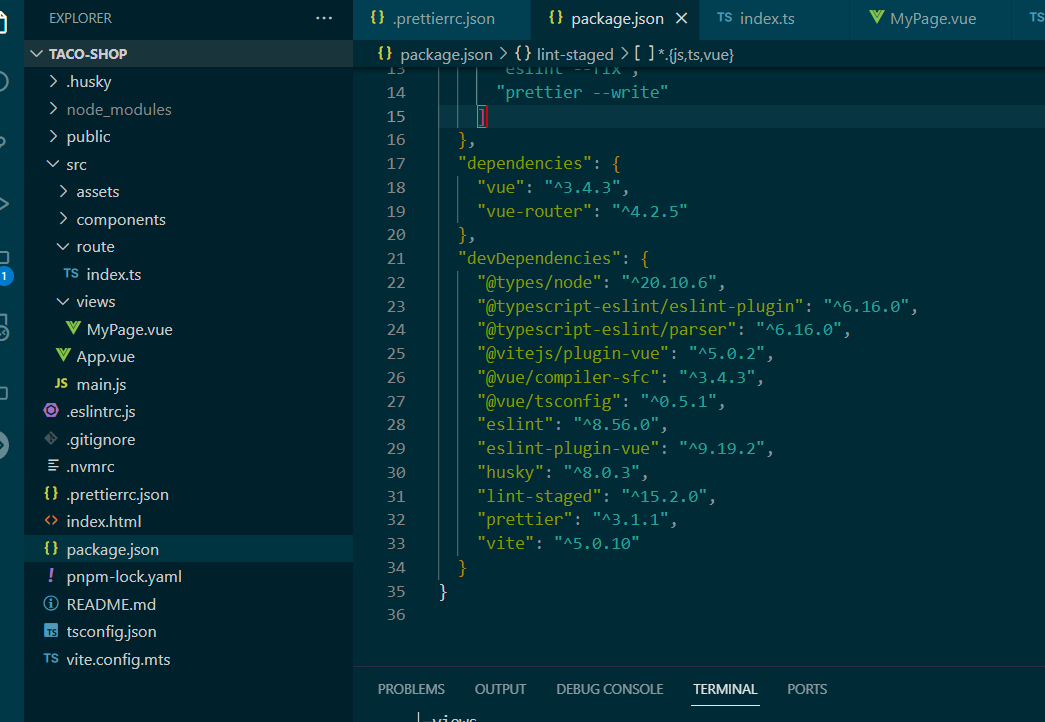
Install dependencies
pnpm install vue-router4.2.5
pm install @vitejs/[email protected] -D
pnpm install @types/node20.10.6 -D
pm install @vue/ts config -D
pnpm install [email protected]
This command installs the Vue Router package version 4.2.5. Vue Router is a library for Vue.js applications that makes it easier to navigate between different components, manage application URLs, and provide navigation history.
pnpm install @vitejs/[email protected] -D
This command installs the Vite plugin for Vue.js version 5.0.2. Vite is a modern web development build tool optimized for Vue.js. This plugin specifically integrates Vue.js with Vite, allowing the use of Vue components in Vite projects.
pnpm install @types/[email protected] -D
This command installs TypeScript type definitions for Node.js version 20.10.6. When using TypeScript, it is important to define types for the libraries you use, and the @types/node package provides these definitions for Node.js.
pnpm install @vue/tsconfig -D
This command installs the Vue.js TypeScript configuration package. The @vue/tsconfig package provides default TypeScript configuration for Vue.js projects. It contains settings commonly used and recommended in Vue development.
This configuration is referenced via the "extends" property in the project's tsconfig.json file.
tsconfig.json
{
  "extends": "@vue/tsconfig/tsconfig.json",
  "compilerOptions": {
      // this to solve some error hints
    "ignoreDeprecations": "5.0",
    "sourceMap": true,
    "baseUrl": ".",
    "paths": {
      "@/*": ["./src/*"]
    },
    "lib": ["esnext", "dom"]
  },

  "vueCompilerOptions": {
    "nativeTags": ["block", "component", "template", "slot"]
  },

  "include": ["src/**/*.ts", "src/**/*.d.ts", "src/**/*.tsx", "src/**/*.vue"]
}
vite.config.mts
// vite.config.mts
import { defineConfig } from 'vite';
import vue from '@vitejs/plugin-vue';
import path from 'path';

export default defineConfig({
  resolve:{
    alias:{
      '@': path.resolve(__dirname, 'src')
    }
  },
  plugins: [vue()]
});
main.ts
import { createApp } from 'vue'
import App from './App.vue'
import router from './route/index.ts';

createApp(App).use(router).mount('#app')
This code sets up a Vue application with a root component (App), uses the Vue Router plugin for navigation, and mounts the entire application to the HTML element with ID "app". This is a common setup for Vue Single Page Applications, where routing is managed by Vue Router and the application is mounted to a specific DOM element.
App.vue
{/* App.vue */}
<template>
    <div id="app">
        <router-view></router-view>
    </div>
</template>
route.ts
// router.ts
import { createRouter, createWebHistory } from 'vue-router'
import type { RouteRecordRaw } from 'vue-router'

const routes: RouteRecordRaw[] = [
  {
    path: '/',
    name: 'home',
    component: () => import('@/views/MyPage.vue'),
    meta: {
      title: 'Home',
    },
  },
]

const router = createRouter({
  history: createWebHistory(),
  routes,
})

export default router
MyPage.vue
<template>
  <view>
    <input type="text" v-model="inputText" />
  </view>
</template>

<script lang="ts" setup>
import { ref } from 'vue'
const inputText = ref<string>('hello')
</script>
Visit
Run pnpm dev, visit localhost:5173 in browser

Conclusion
To prevent command typos, it is recommended to copy the instructions directly and paste them into your VS Code. You can download the code from the GitHub repository.
Thank you for taking the precious time to read the article. If you find my article useful, please give a little affirmation. Also, feel free to ask any questions you may have.
- Attribution: Retain the original author's signature and code source information in the original and derivative code.
- Preserve License: Retain the Apache 2.0 license file in the original and derivative code.
- Attribution: Give appropriate credit, provide a link to the license, and indicate if changes were made.
- NonCommercial: You may not use the material for commercial purposes. For commercial use, please contact the author.
- ShareAlike: If you remix, transform, or build upon the material, you must distribute your contributions under the same license as the original.