Vue3 Starter
Frontend Engineering
SPA, SSR and SSG (Deployment Rendering Methods)
- SPA (Single Page Application):
- Applicable Scenario: Suitable for applications requiring high interactivity and real-time performance, such as Web applications, management backends, social media platforms, etc.
- Advantage: User experience is closer to traditional desktop applications, allowing for more flexible implementation of complex interaction logic.
- Note: Initial load may be slower, support for SEO is relatively poor.
- SSR (Server-Side Rendering):
- Applicable Scenario: Suitable for applications requiring better Search Engine Optimization (SEO) and faster initial load speeds, such as blogs, news websites, etc.
- Advantage: Provides better SEO, speeds up the initial load of the page.
- Note: Server-side rendering usually requires more server resources, so the cost may be higher.
- SSG (Static Site Generation):
- Applicable Scenario: Suitable for sites with relatively fixed content, infrequent changes, and mainly display content, such as corporate official websites, blogs, documentation websites, etc.
- Advantage: Provides very fast loading speeds, suitable for sites that do not need real-time content updates.
- Note: Not suitable for applications requiring real-time data or dynamic content.
nvm Installation and Usage
Configuration
root: D:\software\nvm
path: D:\software\nodejs

node_mirror: https://npm.taobao.org/mirrors/node/
npm_mirror: https://npm.taobao.org/mirrors/npm/
nvm list available
nvm install 20.8.0
nvm list
nvm use 20.8.0

nvm off                     # Disable node.js version management (does not uninstall anything)
nvm on                      # Enable node.js version management
nvm install <version>       # Command to install node.js, version is the version number, example: nvm install 8.12.0
nvm uninstall <version>     # Command to uninstall node.js, uninstall specified version of nodejs, use when installation fails
# Use when uninstall
nvm ls                      # Show all installed node.js versions
nvm list available          # Show all available node.js versions for installation
nvm use <version>           # Switch to use specified nodejs version
nvm v                       # Show nvm version
nvm install stable          # Install latest stable version
babel
Single File Component
Reactive API: reactive
Compared to ref, its limitation is that it is only suitable for objects and arrays.
const uids: number[] = reactive([1, 2, 3])

/**
 * Recommended to use this way, will not break reactivity
 */
uids.length = 0

//Break reactivity
// uids = []

// After asynchronous data acquisition, template can display correctly
setTimeout(() => {
  uids.push(1)
}, 1000)
Do not perform ES6 Destructuring operations on Reactive data, because the variables obtained after destructuring will lose reactivity.
import { defineComponent, reactive } from 'vue'

interface Member {
  id: number
  name: string
}

export default defineComponent({
  setup() {
    // Define an object with reactivity
    const userInfo: Member = reactive({
      id: 1,
      name: 'Petter',
    })

    // Update `userInfo` after 2s
    setTimeout(() => {
      userInfo.name = 'Tom'
    }, 2000)

    // This variable will not update synchronously after 2s
    const newUserInfo: Member = { ...userInfo }

    // This variable will not update synchronously after 2s
    const { name } = userInfo

    // Return like this for template use, will not update synchronously after 2s
    return {
      ...userInfo,
    }
  },
})
Reactive API: toRef and toRefs
toRef
Vue 3 also launched two related APIs: toRef and toRefs, both for converting reactive to ref.
const name = toRef(userInfo, 'name')
console.log(name.value) // Petter
interface Member {
  id: number
  name: string
  // Add a new property to type, because it is optional, default value will be `undefined`
  age?: number
}

// Omit `age` property when declaring variables
const userInfo: Member = reactive({
  id: 1,
  name: 'Petter',
})

// To avoid program runtime errors, can specify an initial value
// But initial value is only valid for Ref variable, will not affect Reactive field value
const age = toRef(userInfo, 'age', 18)
console.log(age.value)  // 18
console.log(userInfo.age) // undefined

// Unless re-assigned, both will update simultaneously
age.value = 25
console.log(age.value)  // 25
console.log(userInfo.age) // 25
toRefs
interface Member {
  id: number
  name: string
}

// Declare a Reactive variable
const userInfo: Member = reactive({
  id: 1,
  name: 'Petter',
})

// Pass to `toRefs` as argument
const userInfoRefs = toRefs(userInfo)
// Import `toRefs` API type
import type { ToRefs } from 'vue'

// Context code omitted...

// Pass original type to API type
const userInfoRefs: ToRefs<Member> = toRefs(userInfo)
or
// Import `ref` API type
import type { Ref } from 'vue'

// Context code omitted...

// Each field of newly declared type is a type of Ref variable
interface MemberRefs {
  id: Ref<number>
  name: Ref<string>
}

// Declare using new type
const userInfoRefs: MemberRefs = toRefs(userInfo)
Do not directly destructure reactive objects, can verify first convert to ref object then destructure
// To improve development efficiency, can directly destructure Ref variable for use
const { name } = toRefs(userInfo)
console.log(name.value) // Petter

// Re-assign destructured variable, original variable can also update synchronously
name.value = 'Tom'
console.log(name.value) // Tom
console.log(userInfo.name) // Tom
Although ref API is convenient to use in <template />, when reading / assigning in <script />, must always remember to add .value, otherwise BUG is coming.
Although reactive API is used, because knowing it is an object itself, so will not forget to operate through formats like foo.bar, but when rendering in <template />, have to use foo.bar format every time.
Since what return out are all Ref variables, so in template can directly use key of each field of userInfo, no longer need to write long userInfo.name.
<template>
  <ul class="user-info">
    <li class="item">
      <span class="key">ID:</span>
      <span class="value">{{ id }}</span>
    </li>

    <li class="item">
      <span class="key">name:</span>
      <span class="value">{{ name }}</span>
    </li>

    <li class="item">
      <span class="key">age:</span>
      <span class="value">{{ age }}</span>
    </li>

    <li class="item">
      <span class="key">gender:</span>
      <span class="value">{{ gender }}</span>
    </li>
  </ul>
</template>
Which one will take effect in {<template />} depends on which one is behind, because what is returned is actually an object, in object, if there is same key, the latter will cover the former.
In the following case, separate name will be used as rendering data:
return {
  ...userInfoRefs,
  name,
}
Watch
Cannot use arrow function to define Watcher function (e.g. searchQuery: newValue => this.updateAutocomplete(newValue)).
Because arrow function binds context of parent scope, so this will not point to component instance as expected, this.updateAutocomplete will be undefined.
Deep watch for reactive and ref?
Default reactive will enable deep watch, default ref will not enable deep watch
// Import isReactive API
import { defineComponent, isReactive, reactive, ref } from 'vue'

export default defineComponent({
  setup() {
    // When watching this data, deep watch will be enabled by default
    const foo = reactive({
      name: 'Petter',
      age: 18,
    })
    console.log(isReactive(foo)) // true

    // When watching this data, deep watch will not be enabled by default
    const bar = ref({
      name: 'Petter',
      age: 18,
    })
    console.log(isReactive(bar)) // false
  },
})
Unmount and Clean up Watch
let unwatch: WatchStopHandle
unwatch = watch(
  message,
  (newValue, oldValue, onCleanup) => {
    // Register cleanup behavior before stopping watch
    onCleanup(() => {
      console.log('Watch cleaning up')
      // Define some cleanup operations according to actual business situation ...
    })
    // Then stop watch
    if (typeof unwatch === 'function') {
      unwatch()
    }
  },
  {
    immediate: true,
  }
)
watchEffect watching multiple data
<script setup>
import { ref, watchEffect } from 'vue';

// Define two data separately, used to change values separately later
const name = ref<string>('Petter');
const age = ref<number>(18);

// Define a function calling these two data
const getUserInfo = (): void => {
  console.log({
    name: name.value,
    age: age.value,
  });
};

// Use watchEffect to directly watch calling function, it will automatically execute when each data changes
watchEffect(getUserInfo);

// Change first data after 2s
setTimeout(() => {
  name.value = 'Tom';
}, 2000);

// Change second data after 4s
setTimeout(() => {
  age.value = 20;
}, 4000);
</script>
Difference between watchEffect and watch
watchEffect is a simplified operation of watch, can be used to replace batch watch, but they also have certain differences:
watchcan access values before and after watch state change, whilewatchEffectcannot.watchexecutes only when attribute changes, whilewatchEffectdefaults to execute once, and then executes when attribute changes.
style module
Use v-html to bind css styles
<template>
  <div v-html="content"></div>
</template>

<script lang="ts">
import { defineComponent, useCssModule } from 'vue'

export default defineComponent({
  setup() {
    // Get style
    const style = useCssModule('classes')

    // Write template content
    const content = `<p class="${style.msg}">
      <span class="${style.text}">Hello World! —— from v-html</span>
    </p>`

    return {
      content,
    }
  },
})
</script>

<style module="classes">
.msg {
  color: #ff0000;
}
.text {
  font-size: 14px;
}
</style>
Pinia State Management
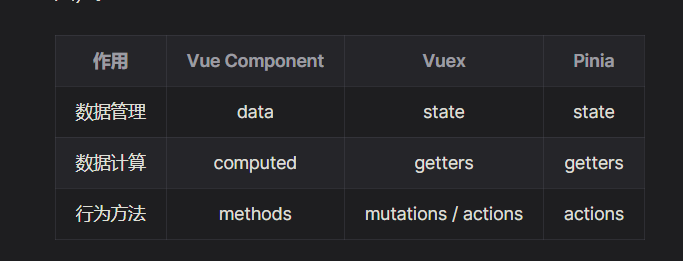
Original Address Vue3 Starter Guide and Practical Cases
pinia storeToRefs returns reactive data
import { defineComponent } from 'vue'
import { useStore } from '@/stores'

// Remember to import this API
import { storeToRefs } from 'pinia'

export default defineComponent({
  setup() {
    const store = useStore()

    // Get reactive message through storeToRefs
    const { message } = storeToRefs(store)
    console.log('message', message.value)

    return {
      message,
    }
  },
})
// Assignments directly
message.value = 'New Message.'

// Data on store has successfully become New Message.
console.log(store.message)
toRef
// Note toRef is vue API, not Pinia
import { defineComponent, toRef } from 'vue'
import { useStore } from '@/stores'

export default defineComponent({
  setup() {
    const store = useStore()

    // Follow usage of toRef
    const message = toRef(store, 'message')
    console.log('message', message.value)

    return {
      message,
    }
  },
})
Equivalent Type Declaration
const imageListD = ref([] as ImageData[]);
const imageListD = ref<ImageData[]>([]);
pinia modifies multiple parameters simultaneously
// Continue using previous data, print value before modification here
console.log(JSON.stringify(store.$state))
// Output {"message":"Hello World","randomMessages":[]}

/**
 * Note here, passed in an object
 */
store.$patch({
  message: 'New Message',
  randomMessages: ['msg1', 'msg2', 'msg3'],
})

// Print value after modification here
console.log(JSON.stringify(store.$state))
// Output {"message":"New Message","randomMessages":["msg1","msg2","msg3"]}
pinia passes in a function
// Print value before modification here
console.log(JSON.stringify(store.$state))
// Output {"message":"Hello World","randomMessages":[]}

/**
 * Note here, this time passed in a function
 */
store.$patch((state) => {
  state.message = 'New Message'

  // Push to array instead of re-assigning
  for (let i = 0; i < 3; i++) {
    state.randomMessages.push(`msg${i + 1}`)
  }
})

// Print value after modification here
console.log(JSON.stringify(store.$state))
// Output {"message":"New Message","randomMessages":["msg1","msg2","msg3"]}
When using this way, same as passing in an object can only modify defined data, and also need to note, passed function can only be synchronous function, cannot be asynchronous function!
pinia resets state
// This store is the instance defined above
store.$reset()
Efficient Development
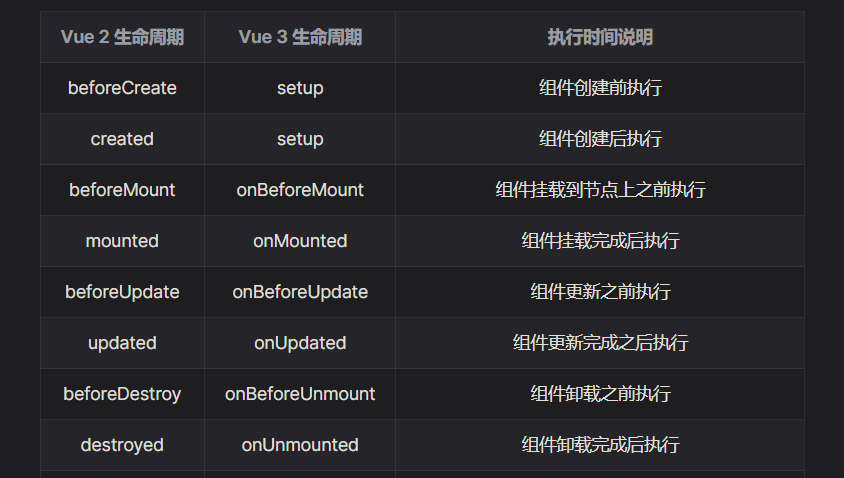
script-setup
In Vue 3 Composition API writing, if data or function needs to be used in <template />, must return it in setup. Data or function only called in <script />, no need to render to template, no need return.
script-setup is introduced to let developers familiar with Vue 3 develop components more efficiently, reduce mental burden during coding, just add a setup attribute to <script /> tag, then the whole <script /> will directly become setup function, all top-level variables, functions will be automatically exposed to template (no need to return one by one).
So why Vue 3 abandon
Object.defineProperty, switch toProxy
- Cannot watch array index changes, operations like
arr[i] = newValuecannot respond in real time- Cannot watch array length changes, e.g. modify array length via
arr.length = 10, cannot respond- Can only watch object properties, need to traverse for entire object, especially multi-level object needs deep watch via nesting
- Use
Object.assign()etc. to add new properties to object, will not trigger update
defineProps
If want to set data as optional, also follow TS specification, allow optional via English question mark ?:
defineProps({
  name: {
    type: String,
    required: false,
    default: 'Petter',
  },
  userInfo: Object,
  tags: Array,
})
defineEmits
// Get emit
const emit = defineEmits(['update-name'])

// Call emit
emit('update-name', 'Tom')
Change in picking method of attrs
import { useAttrs } from 'vue'

// Get attrs
const attrs = useAttrs()

// attrs is an object, same as props, need to get corresponding single attr via `key`
console.log(attrs.msg)
Parent component uses child component data
In script-setup mode, if want to call child component data, need to explicitly expose in child component first, then can get correctly, this operation is completed by defineExpose API.
<script setup lang="ts">
const msg = 'Hello World!'

// Data explicitly exposed via this API can be obtained in parent component
defineExpose({
  msg,
})
</script>
Naming Convention Description
Page name, ts kebab-case naming
Component PascalCase naming, i.e. Big Camel Case
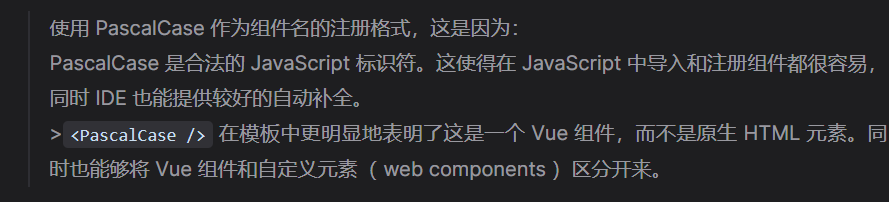
Variable naming small camel case
- Attribution: Retain the original author's signature and code source information in the original and derivative code.
- Preserve License: Retain the Apache 2.0 license file in the original and derivative code.
- Attribution: Give appropriate credit, provide a link to the license, and indicate if changes were made.
- NonCommercial: You may not use the material for commercial purposes. For commercial use, please contact the author.
- ShareAlike: If you remix, transform, or build upon the material, you must distribute your contributions under the same license as the original.