MCP
What is MCP?
MCP (Model Context Protocol) is a standardized protocol designed to simplify interaction between Large Language Models (LLM) and external data sources (such as databases, APIs, etc.). Through MCP, developers can let LLM access and operate various data sources in a unified way, thereby improving utility and scalability of models.
Core Components of MCP
- MCP Server: Responsible for processing requests from LLM and forwarding them to corresponding data source. It acts as intermediary between LLM and external systems.
- MCP Client: Integrated in LLM, used for sending requests to MCP Server and receiving responses.
- Data Source Adapter: Used for connecting different types of data sources (such as SQL databases, NoSQL databases, RESTful APIs, etc.) and converting data into format understandable by MCP.
Working Principle of MCP
- Request Sending: LLM sends request to MCP Server via MCP Client, specifying required data operation (such as query, insert, update, etc.).
- Request Processing: After receiving request, MCP Server parses request content and calls corresponding data source adapter.
- Data Operation: Data source adapter interacts with external data source and executes required operation.
- Response Return: After operation is completed, data source adapter returns result to MCP Server, which then sends result back to LLM.
Advantages of MCP
- Standardized Interface: Through unified protocol, simplifies process of integrating LLM with multiple data sources.
- Strong Scalability: Supports multiple data source types, facilitating future extension and integration of new data sources.
- Improve Efficiency: Reduces repetitive work for developers when integrating data sources, improving development efficiency.
- Enhance Model Capabilities: Enables LLM to access more real-time and structured data, improving accuracy and relevance of its answers.
Application Scenarios of MCP
- Enterprise Knowledge Base: Let LLM access enterprise internal databases to provide more accurate business consultation and support.
- Dynamic Data Query: Connect real-time data sources via MCP, such as stock market data, weather information, etc., enhancing real-time response capability of model.
- Multi-Source Integration: Integrate multiple data sources in one application, such as CRM system, ERP system, etc., providing unified query interface.
- Customized Application: Customize development of MCP adapters according to specific business needs to achieve specific data interaction functions.
Practice Examples
Simple Implementation of MCP Server
Here is a simple MCP Server implementation example using FastAPI framework:
from mcp.server.fastmcp import FastMCP

mcp = FastMCP("Simple-Math-Server")


@mcp.tool()
def add_numbers(a: int, b: int) -> dict:
    """Add two numbers together and return a structured object."""
    total = a + b

    # Return a dictionary that matches your desired "properties" structure
    return {
        "result": total
    }


if __name__ == "__main__":
    mcp.run()
Using Claude Desktop App to Call MCP Server
Claude MCP Configuration
{
  "mcpServers": {
    "my-math-tool": {
      "command": "python",
      "args": ["D:/project/PycharmProjects/fastApiProject/mcp-server.py"]
    }
  }
}
File Location:
Mac: ~/Library/Application Support/Claude/claude_desktop_config.json
Windows: %APPDATA%\Claude\claude_desktop_config.json
Omitted...
Using MCP Inspector to Call MCP Server
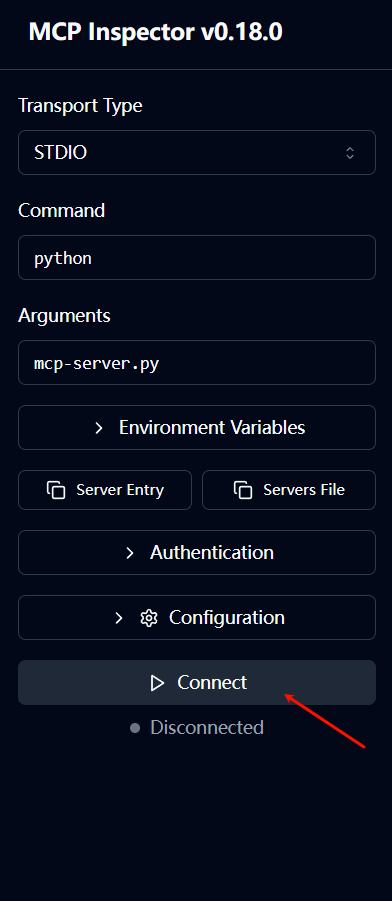
- Start MCP Server:
npx @modelcontextprotocol/inspector python mcp-server.py
tip
pip install mcp should be installed in global environment, not just in virtual environment, otherwise Claude cannot find MCP package.
- Connect in web page
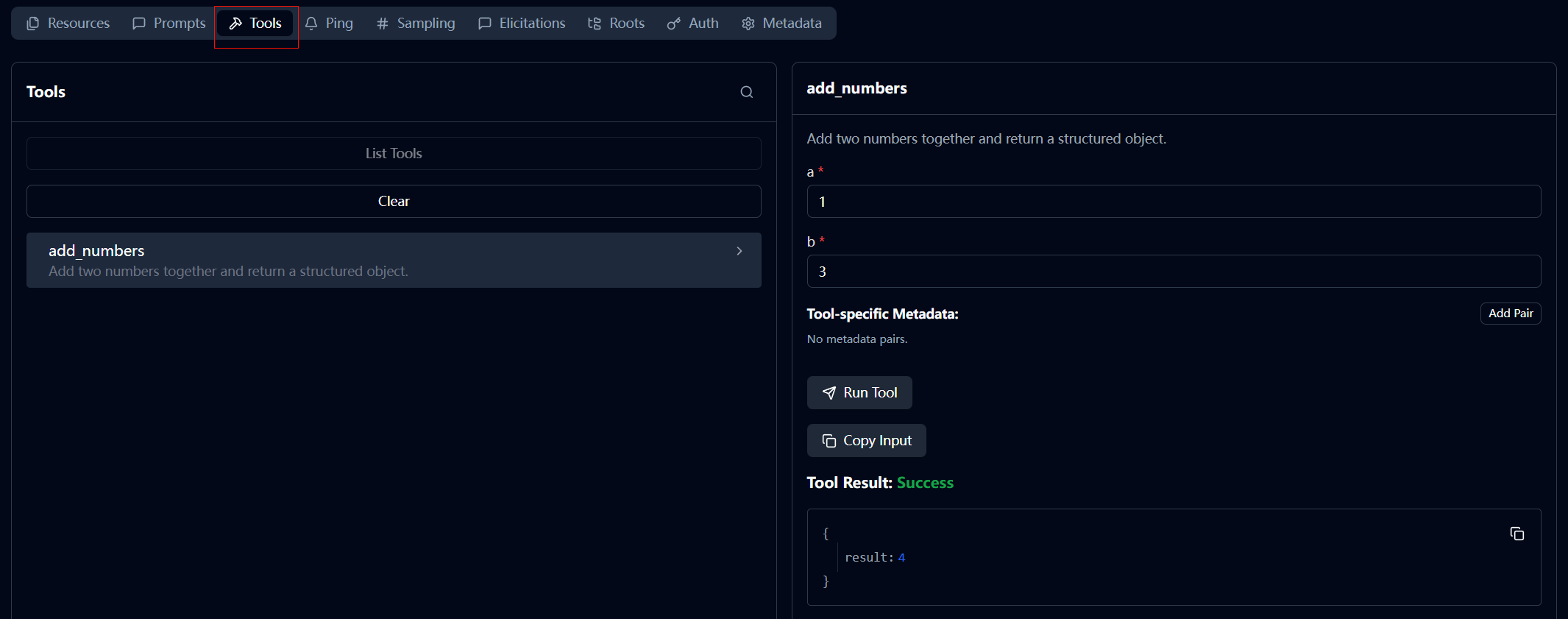
- Call
add_numbersmethod
Using LangChain to Call MCP Server
mcp-client.py
import asyncio
import sys
import operator
from typing import Annotated, TypedDict, List

# MCP SDK
from mcp import ClientSession, StdioServerParameters
from mcp.client.stdio import stdio_client

# LangChain / LangGraph
from langchain_ollama import ChatOllama
from langchain_core.tools import StructuredTool
from langchain_core.messages import BaseMessage, HumanMessage, ToolMessage
from langgraph.graph import StateGraph, END

# --- 1. Define State ---
class AgentState(TypedDict):
    messages: Annotated[List[BaseMessage], operator.add]

# --- 2. Converter: Turn MCP Tool into LangChain Tool ---
def mcp_to_langchain(mcp_tool, session):
    async def _tool_func(**kwargs):
        # Call MCP Server
        result = await session.call_tool(mcp_tool.name, arguments=kwargs)
        # Extract result text
        if result.content and result.content[0].type == "text":
            return result.content[0].text
        return str(result)

    return StructuredTool.from_function(
        func=None,
        coroutine=_tool_func, # LangChain supports async tools
        name=mcp_tool.name,
        description=mcp_tool.description
    )

# --- 3. Main Program ---
async def main():
    # Configure Server Start Parameters (Ensure server.py and client.py are in same directory)
    server_params = StdioServerParameters(
        command=sys.executable,
        args=["D:/project/PycharmProjects/fastApiProject/mcp-server.py"],
        env=None
    )

    print("🔌 Client: Connecting to MCP Server...")

    # Establish Connection
    async with stdio_client(server_params) as (read, write):
        async with ClientSession(read, write) as session:
            # Initialize
            await session.initialize()

            # Get Tools
            tools_data = await session.list_tools()
            mcp_tools = tools_data.tools
            print(f"🛠️  Client: Found Tools -> {[t.name for t in mcp_tools]}")

            # Convert Tools to LangChain
            lc_tools = [mcp_to_langchain(t, session) for t in mcp_tools]

            # Initialize LLM (Ensure your Ollama has pulled llama3.1 or qwen2.5)
            llm = ChatOllama(model="llama3.1", temperature=0)
            llm_with_tools = llm.bind_tools(lc_tools)

            # --- Build LangGraph ---

            async def call_model(state: AgentState):
                # Call LLM
                response = await llm_with_tools.ainvoke(state["messages"])
                return {"messages": [response]}

            async def call_tools(state: AgentState):
                last_message = state["messages"][-1]
                results = []
                for call in last_message.tool_calls:
                    print(f"🤖 Agent: Decided to call tool '{call['name']}' Args: {call['args']}")

                    # Find and Execute Tool
                    tool = next((t for t in lc_tools if t.name == call['name']), None)
                    if tool:
                        output = await tool.coroutine(**call['args'])
                        print(f"✅ Agent: Tool returned result -> {output}")

                        results.append(ToolMessage(
                            content=output,
                            tool_call_id=call["id"],
                            name=call["name"]
                        ))
                return {"messages": results}

            # Define Graph Structure
            workflow = StateGraph(AgentState)
            workflow.add_node("llm", call_model)
            workflow.add_node("tools", call_tools)
            workflow.set_entry_point("llm")

            # Conditional Edge: If tool_calls exist go to tools, otherwise end
            workflow.add_conditional_edges(
                "llm",
                lambda s: "tools" if s["messages"][-1].tool_calls else END
            )
            workflow.add_edge("tools", "llm")

            agent = workflow.compile()

            # --- Run Test ---
            query = "Please calculate how much is 100 plus 55?"
            print(f"\n👤 User: {query}")
            print("-" * 50)

            inputs = {"messages": [HumanMessage(content=query)]}

            # Run Graph
            async for chunk in agent.astream(inputs, stream_mode="values"):
                # Only print content of last message of every step
                msg = chunk["messages"][-1]
                # print(f"[{msg.type}]: {msg.content}")

            # Print Final Reply
            print("-" * 50)
            print(f"💡 Final Answer: {chunk['messages'][-1].content}")

if __name__ == "__main__":
    asyncio.run(main())
Output:
🔌 Client: Connecting to MCP Server...
🛠️  Client: Found Tools -> ['add_numbers']

👤 User: Please calculate how much is 100 plus 55?
--------------------------------------------------
🤖 Agent: Decided to call tool 'add_numbers' Args: {'a': 100, 'b': 55}
✅ Agent: Tool returned result -> {
  "result": 155
}
--------------------------------------------------
💡 Final Answer: 100 plus 55 equals 155.