BeanFactoryPostProcessor
Please refer to spring-framework under org.springframework.mylearntest package for code related to this article (from official source spring-test module).
Container Startup Stage
- Start of container startup, first will load Configuration MetaData through some way. Besides code way being more direct, in most cases, container needs to rely on certain tool classes (BeanDefinitionReader) to parse and analyze loaded Configuration MetaData, and group analyzed information into corresponding BeanDefinition, finally register these BeanDefinitions saving necessary bean definition information to corresponding BeanDefinitionRegistry, thus container startup work is completed.
Bean Instantiation Stage
-
First stage: Now all bean definition information is registered to BeanDefinitionRegistry via BeanDefinition.
-
Second stage: When a requester explicitly requests an object via container's getBean method, or when container needs to implicitly call getBean method due to dependency relationship. In this stage, container will first check if requested object has been initialized before. If not, it will instantiate requested object according to information provided by registered BeanDefinition, and inject dependencies for it. If this object implements certain callback interfaces, it will also assemble it according to callback interface requirements. After this object is assembled, container will immediately return it to requester for use.
BeanFactoryPostProcessor
Spring provides a container extension mechanism called BeanFactoryPostProcessor. This mechanism allows us to modify information saved in BeanDefinition registered to container before container instantiates corresponding objects. This is equivalent to adding a procedure at the end of first stage of container implementation, allowing us to do some extra operations on final BeanDefinition, such as modifying certain properties of bean definition, adding other information for bean definition etc.
If want to custom implement BeanFactoryPostProcessor, usually we need to implement org.springframework.beans.factory.config.BeanFactoryPostProcessor interface. At this time, it may be necessary for implementation class to simultaneously implement Spring's org.springframework.core.Ordered interface, to ensure each BeanFactoryPostProcessor can execute according to pre-set order (if order matters).
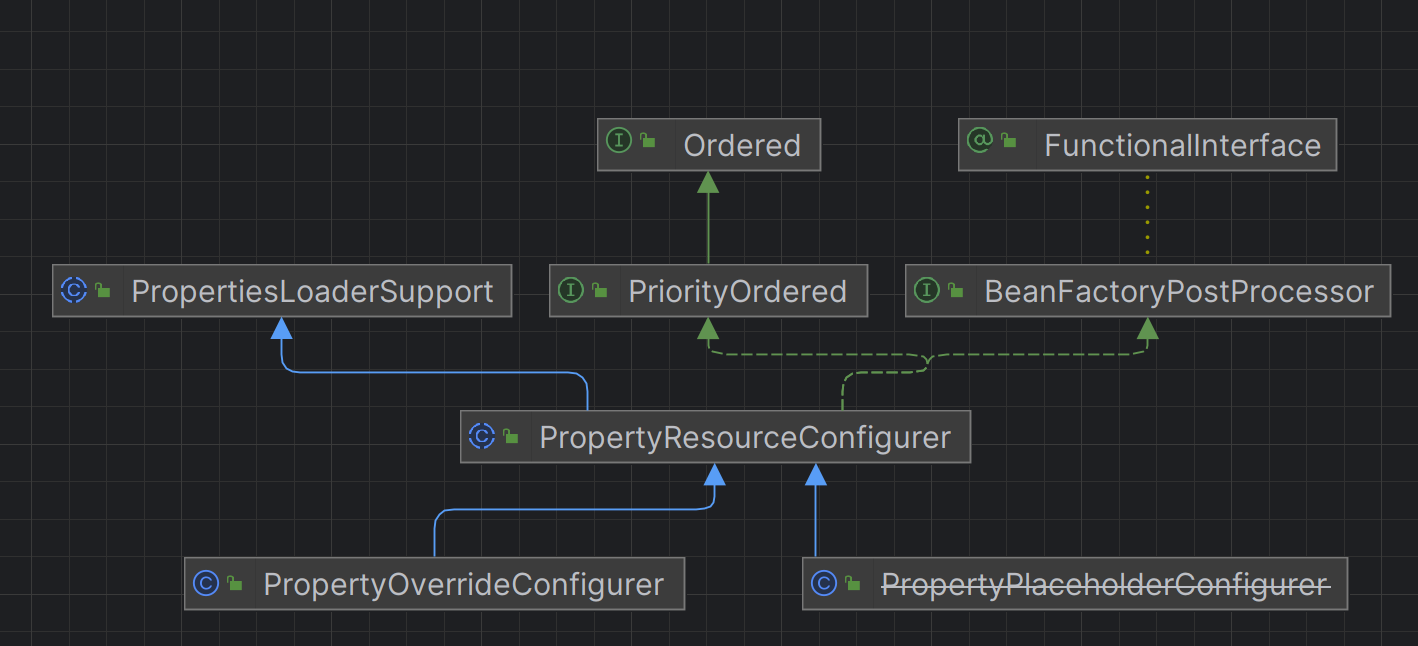
Among them, org.springframework.beans.factory.config.PropertyPlaceholderConfigurer and org.springframework.beans.factory.config.PropertyOverrideConfigurer are two more commonly used BeanFactoryPostProcessors.
PropertyPlaceholderConfigurer
xml configuration
<?xml version="1.0" encoding="UTF-8"?>
<beans xmlns="http://www.springframework.org/schema/beans"
	   xmlns:xsi="http://www.w3.org/2001/XMLSchema-instance"
	   xsi:schemaLocation="http://www.springframework.org/schema/beans http://www.springframework.org/schema/beans/spring-beans.xsd">
	<!--	Used BeanFactoryPostProcessor-->
	<!--	Data source configuration using PropertyPlaceholderConfigurer placeholder-->
	<bean class="org.springframework.beans.factory.config.PropertyPlaceholderConfigurer">
		<property name="locations">
			<list>
				<value>../conf/jdbc.properties</value>
				<value>../conf/mail.properties</value>
			</list>
		</property>
	</bean>

	<bean id="dataSource" class="org.apache.commons.dbcp2.BasicDataSource" destroy-method="close">
		<property name="url" value="${jdbc.url}"/>
		<property name="driverClassName" value="${jdbc.driver}"/>
		<property name="username" value="${jdbc.username}"/>
		<property name="password" value="${jdbc.password}"/>
		<property name="testOnBorrow" value="true"/>
		<property name="testOnReturn" value="true"/>
		<property name="testWhileIdle" value="true"/>
		<property name="minEvictableIdleTimeMillis" value="180000"/>
		<property name="timeBetweenEvictionRunsMillis" value="360000"/>
		<property name="validationQuery" value="SELECT 1"/>
		<property name="maxOpenPreparedStatements" value="100"/>
	</bean>

	<!--  Use PropertyOverrideConfigurer to replace configuration in PropertyPlaceholderConfigurer-->
	<bean class="org.springframework.beans.factory.config.PropertyOverrideConfigurer">
		<property name="location" value="../conf/pool-adjustment.properties"/>
	</bean>
</beans>
jdbc.properties
jdbc.url=jdbc:mysql://server/MAIN?useUnicode=true&characterEncoding=ms932&failOverReadOnly=false&roundRobinLoadBalance=true
jdbc.driver=com.mysql.jdbc.Driver
jdbc.username=root
jdbc.password=root
If org.apache.commons.dbcp2.BasicDataSource errors, need to introduce dependency api("org.apache.commons:commons-dbcp2:2.1.1")
When BeanFactory finishes loading all configuration information in first stage, property information of objects saved in BeanFactory only exists in form of placeholders, such as ${jdbc.url}, ${jdbc.driver}. When PropertyPlaceholderConfigurer is applied as BeanFactoryPostProcessor, it will use configuration information in properties configuration file to replace property values represented by placeholders in corresponding BeanDefinition. In this way, when entering second stage of container implementation to instantiate bean, property values in bean definition are finally replaced.
- PropertyPlaceholderConfigurer not only loads configuration items from its configured properties files, but also checks Properties in Java's System class, can control behavior of loading or overriding System corresponding Properties via
setSystemPropertiesMode()orsetSystemPropertiesModeName(). - PropertyPlaceholderConfigurer provides three modes: SYSTEM_PROPERTIES_MODE_FALLBACK, SYSTEM_PROPERTIES_MODE_NEVER and SYSTEM_PROPERTIES_MODE_OVERRIDE. Default used is SYSTEM_PROPERTIES_ MODE_FALLBACK, if corresponding configuration item is not found in properties file, then check in System's Properties, we can also choose not to check System's Properties or override it.
PropertyOverrideConfigurer
Information configured in properties files usually is represented in plain text, PropertyOverrideConfigurer's parent class PropertyResourceConfigurer provides a protected type method convertPropertyValue, allowing subclasses to override this method to convert corresponding configuration items, such as decrypting encrypted string and then covering to corresponding bean definition. Of course, since PropertyPlaceholderConfigurer also inherits PropertyResourceConfigurer, we can also apply similar functions for PropertyPlaceholderConfigurer.
<bean class="org.springframework.beans.factory.config.PropertyOverrideConfigurer">
    <property name="location" value="pool-adjustment.properties"/>
</bean>
dataSource.minEvictableIdleTimeMillis=1000
dataSource.maxOpenPreparedStatements=50
CustomEditorConfigurer
CustomEditorConfigurer is another type of BeanFactoryPostProcessor implementation, it just auxiliary registers information used in later stage to container, does not make any changes to BeanDefinition.
Some PropertyEditor: StringArrayPropertyEditor provided by Spring. This PropertyEditor will convert CSV format string into form of String[] array, default is comma (,) separated string, but can specify custom string separator. ByteArrayPropertyEditor, CharArrayPropertyEditor etc. all belong to PropertyEditors with similar functions, refer to Javadoc to get corresponding detailed information.
- ClassEditor. Based on String type class name, directly convert it to corresponding Class object, equivalent to effect completed by Class.forName(String). Can pass in value to be converted in form of String[] array to achieve same purpose as providing ClassArrayEditor.
- FileEditor. Spring provided PropertyEditor corresponding to java.io.File type. PropertyEditors also belonging to resource positioning include InputStreamEditor, URLEditor, etc.
- LocaleEditor. PropertyEditor for java.util.Locale type, format can refer to Javadoc description of LocaleEditor and Locale.
- PatternEditor. PropertyEditor for java.util.regex.Pattern introduced after Java SE 1.4, format can refer to Javadoc of java.util.regex.Pattern class.
The above PropertyEditors, container usually defaults to loading and using, so even if we don't tell container how to convert these types, container can still complete work correctly. But when type we need is not included in above mentioned PropertyEditors, we need to implement PropertyEditor for this type, and inform container via CustomEditorConfigurer, so that container uses appropriate PropertyEditor at appropriate time.
Custom PropertyEditor
For Date type, different Locales, different systems have different requirements in presentation form. For example, this part of system needs date in yyyy-MM-dd form, that part of system might need yyyyMMdd form to convert date.
DatePropertyEditor
package org.springframework.mylearntest.beanfactorypostprocessor;

import java.beans.PropertyEditorSupport;
import java.time.LocalDate;
import java.time.format.DateTimeFormatter;

public class DatePropertyEditor extends PropertyEditorSupport {
    private String datePattern;

    @Override
    public void setAsText(String text) throws IllegalArgumentException {
        DateTimeFormatter dateTimeFormatter = DateTimeFormatter.ofPattern(getDatePattern());
        LocalDate dateValue = LocalDate.parse(text,dateTimeFormatter);
        setValue(dateValue);
    }

    @Override
    public String getAsText() {
        return super.getAsText();
    }

    public String getDatePattern() {
        return datePattern;
    }

    public void setDatePattern(String datePattern) {
        this.datePattern = datePattern;
    }
}
If only support one-way conversion from String to corresponding object type, just override method setAsText(String). If want to support two-way conversion, need to consider overriding getAsText() method simultaneously.
DatePropertyEditorRegistrar
package org.springframework.mylearntest.beanfactorypostprocessor;

import org.springframework.beans.PropertyEditorRegistrar;
import org.springframework.beans.PropertyEditorRegistry;

import java.beans.PropertyEditor;

public class DatePropertyEditorRegistrar implements PropertyEditorRegistrar {
    private PropertyEditor propertyEditor;

    public PropertyEditor getPropertyEditor() {
        return propertyEditor;
    }

    public void setPropertyEditor(PropertyEditor propertyEditor) {
        this.propertyEditor = propertyEditor;
    }

    @Override
    public void registerCustomEditors(PropertyEditorRegistry registry) {
        registry.registerCustomEditor(java.util.Date.class, getPropertyEditor());
    }
}
xml configuration
<?xml version="1.0" encoding="UTF-8"?>
<beans xmlns="http://www.springframework.org/schema/beans"
       xmlns:xsi="http://www.w3.org/2001/XMLSchema-instance"
       xsi:schemaLocation="http://www.springframework.org/schema/beans http://www.springframework.org/schema/beans/spring-beans.xsd"
       xmlns:aop="http://www.springframework.org/schema/aop">

    <bean class="org.springframework.beans.factory.config.CustomEditorConfigurer">
        <property name="propertyEditorRegistrars">
            <list>
                <ref bean="datePropertyEditorRegistrar"/>
            </list>
        </property>
    </bean>

    <bean id="datePropertyEditorRegistrar" class="org.springframework.mylearntest.beanfactorypostprocessor.DatePropertyEditorRegistrar">
        <property name="propertyEditor">
            <ref bean="datePropertyEditor"/>
        </property>
    </bean>

    <bean id="datePropertyEditor" class="org.springframework.mylearntest.beanfactorypostprocessor.DatePropertyEditor">
        <property name="datePattern">
            <value>yyyy/MM/dd</value>
        </property>
    </bean>
</beans>
Test Class
package org.springframework.mylearntest.beanfactorypostprocessor;

import org.springframework.context.ApplicationContext;
import org.springframework.context.support.ClassPathXmlApplicationContext;

public class Test4DateProp {
    public static void main(String[] args) {
        // applicationContext
        ApplicationContext context = new ClassPathXmlApplicationContext("datepropertyeditor2.xml");
        DatePropertyEditor datePropertyEditor = (DatePropertyEditor) context.getBean("datePropertyEditor");
        datePropertyEditor.setAsText("2020/06/21");
    }
}
References
- Book Name: Spring Unveiled Author: Wang Fuqiang
- Attribution: Retain the original author's signature and code source information in the original and derivative code.
- Preserve License: Retain the Apache 2.0 license file in the original and derivative code.
- Attribution: Give appropriate credit, provide a link to the license, and indicate if changes were made.
- NonCommercial: You may not use the material for commercial purposes. For commercial use, please contact the author.
- ShareAlike: If you remix, transform, or build upon the material, you must distribute your contributions under the same license as the original.