Python 使用问题
pip 源设置
在 C:\Users\xxx\pip下创建 pip.ini文件,内容如下
[global]
index-url = https://pypi.tuna.tsinghua.edu.cn/simple
extra-index-url =
    https://mirrors.aliyun.com/pypi/simple/
    https://mirror.baidu.com/pypi/simple
如何使用python虚拟环境
创建虚拟环境

python -m venv .venv

激活虚拟环境

.\.venv\Scripts\Activate.ps1
在VScode中使用jupyter
# 升级pip
python -m pip install --upgrade pip
# 安装jupyter
python -m pip install ipykernel jupyter
# 安装常用包
pip install -r requirements.txt
卸载python报错
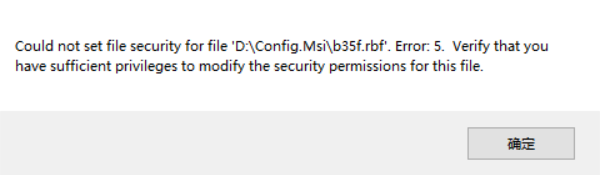
解决方案 以管理员身份运行安装包进行卸载。
(详情请参考)[https://blog.csdn.net/weixin_44628096/article/details/149024298]
Agreement
The code part of this work is licensed under Apache License 2.0 . You may freely modify and redistribute the code, and use it for commercial purposes, provided that you comply with the license. However, you are required to:
- Attribution: Retain the original author's signature and code source information in the original and derivative code.
- Preserve License: Retain the Apache 2.0 license file in the original and derivative code.
- Attribution: Give appropriate credit, provide a link to the license, and indicate if changes were made.
- NonCommercial: You may not use the material for commercial purposes. For commercial use, please contact the author.
- ShareAlike: If you remix, transform, or build upon the material, you must distribute your contributions under the same license as the original.