Deploy with Docker in IDEA
Docker Configuration in Linux
systemctl disable firewalld --now
setenforce 0
sed  -i -r 's/SELINUX=[ep].*/SELINUX=disabled/g' /etc/selinux/config
swapoff -a
sed -i '/swap/s/^\(.*\)$/#\1/g' /etc/fstab

cat <<EOF > /usr/lib/systemd/system/docker.service
[Unit]
Description=Docker Application Container Engine
Documentation=https://docs.docker.com
After=network-online.target firewalld.service containerd.service
Wants=network-online.target
Requires=docker.socket containerd.service

[Service]
Type=notify
# the default is not to use systemd for cgroups because the delegate issues still
# exists and systemd currently does not support the cgroup feature set required
# for containers run by docker
ExecStart=/usr/bin/dockerd -H fd:// -H tcp://0.0.0.0:2375 -H unix://var/run/docker.sock --containerd=/run/containerd/containerd.sock
ExecReload=/bin/kill -s HUP $MAINPID
TimeoutSec=0
RestartSec=2
Restart=always

# Note that StartLimit* options were moved from "Service" to "Unit" in systemd 229.
# Both the old, and new location are accepted by systemd 229 and up, so using the old location
# to make them work for either version of systemd.
StartLimitBurst=3

# Note that StartLimitInterval was renamed to StartLimitIntervalSec in systemd 230.
# Both the old, and new name are accepted by systemd 230 and up, so using the old name to make
# this option work for either version of systemd.
StartLimitInterval=60s

# Having non-zero Limit*s causes performance problems due to accounting overhead
# in the kernel. We recommend using cgroups to do container-local accounting.
LimitNOFILE=infinity
LimitNPROC=infinity
LimitCORE=infinity

# Comment TasksMax if your systemd version does not support it.
# Only systemd 226 and above support this option.
TasksMax=infinity

# set delegate yes so that systemd does not reset the cgroups of docker containers
Delegate=yes

# kill only the docker process, not all processes in the cgroup
KillMode=process
OOMScoreAdjust=-500

[Install]
WantedBy=multi-user.target
EOF
IDEA Configuration Screenshot
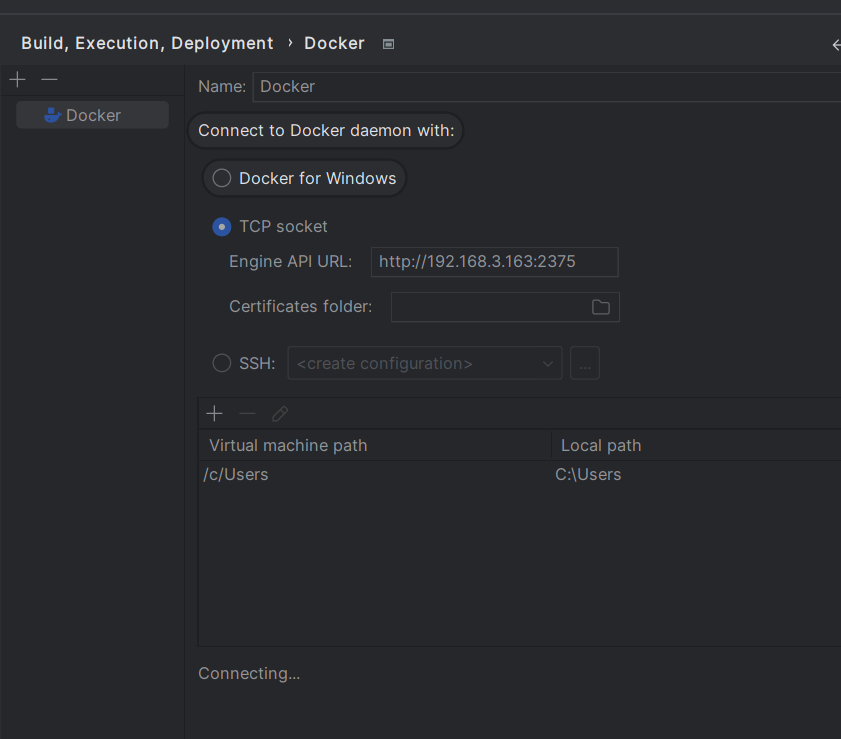
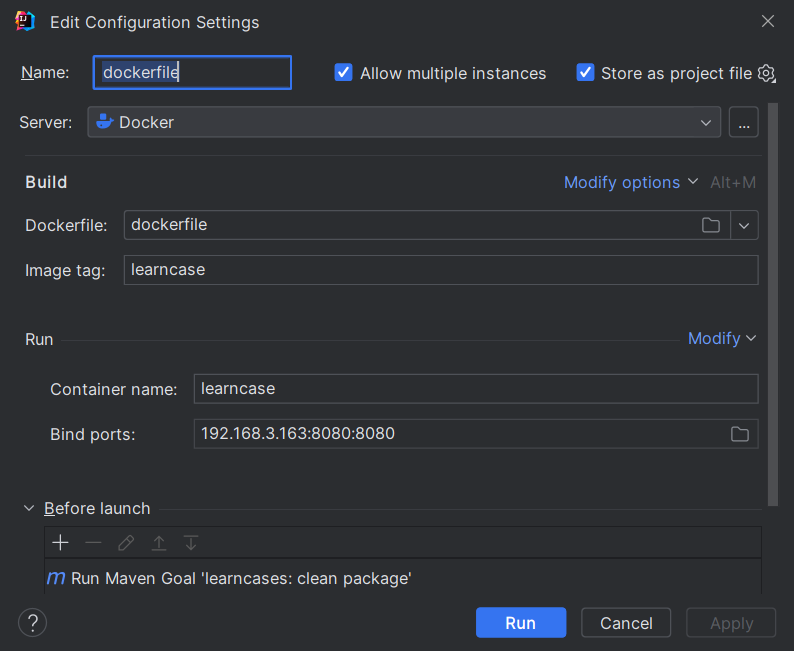
DockerFile
FROM openjdk:8u342-jdk

WORKDIR /deployment

# Copy jar package under current directory to / directory of docker container
ADD ./target/learncases-0.0.1-SNAPSHOT.jar app.jar
RUN jar -xvf app.jar && rm -f app.jar
# Declare service running on port 8080
EXPOSE 8080
# Specify to run jar package when docker container starts
ENTRYPOINT ["java","-cp","/deployment","-DSpring.profiles.active=default","org.springframework.boot.loader.JarLauncher"]
dockerfile.run.xml
<component name="ProjectRunConfigurationManager">
  <configuration default="false" name="dockerfile" type="docker-deploy" factoryName="dockerfile" editBeforeRun="true" singleton="false" server-name="Docker">
    <deployment type="dockerfile">
      <settings>
        <option name="imageTag" value="learncase" />
        <option name="containerName" value="learncase" />
        <option name="portBindings">
          <list>
            <DockerPortBindingImpl>
              <option name="containerPort" value="8080" />
              <option name="hostIp" value="192.168.3.163" />
              <option name="hostPort" value="8080" />
            </DockerPortBindingImpl>
          </list>
        </option>
        <option name="sourceFilePath" value="dockerfile" />
      </settings>
    </deployment>
    <method v="2">
      <option name="Maven.BeforeRunTask" enabled="true" file="$PROJECT_DIR$/pom.xml" goal="clean package" />
    </method>
  </configuration>
</component>
Deploy with docker-compose in IDEA
docker-compose.yml
version: '2'
services:
  learn-cases1:
    container_name: learn-cases1
    build:
      context: .
      dockerfile: Dockerfile
    image: learncase:latest
    ports:
      - "8080:8080"
  learn-cases2:
    container_name: learn-cases2
    build:
      context: .
      dockerfile: Dockerfile
    image: learncase:latest
# External port 8081 Container port 8080
    ports:
      - "8081:8080"
  learn-cases3:
    container_name: learn-cases3
    build:
      context: .
      dockerfile: Dockerfile
    image: learncase:latest
    ports:
      - "8082:8080"
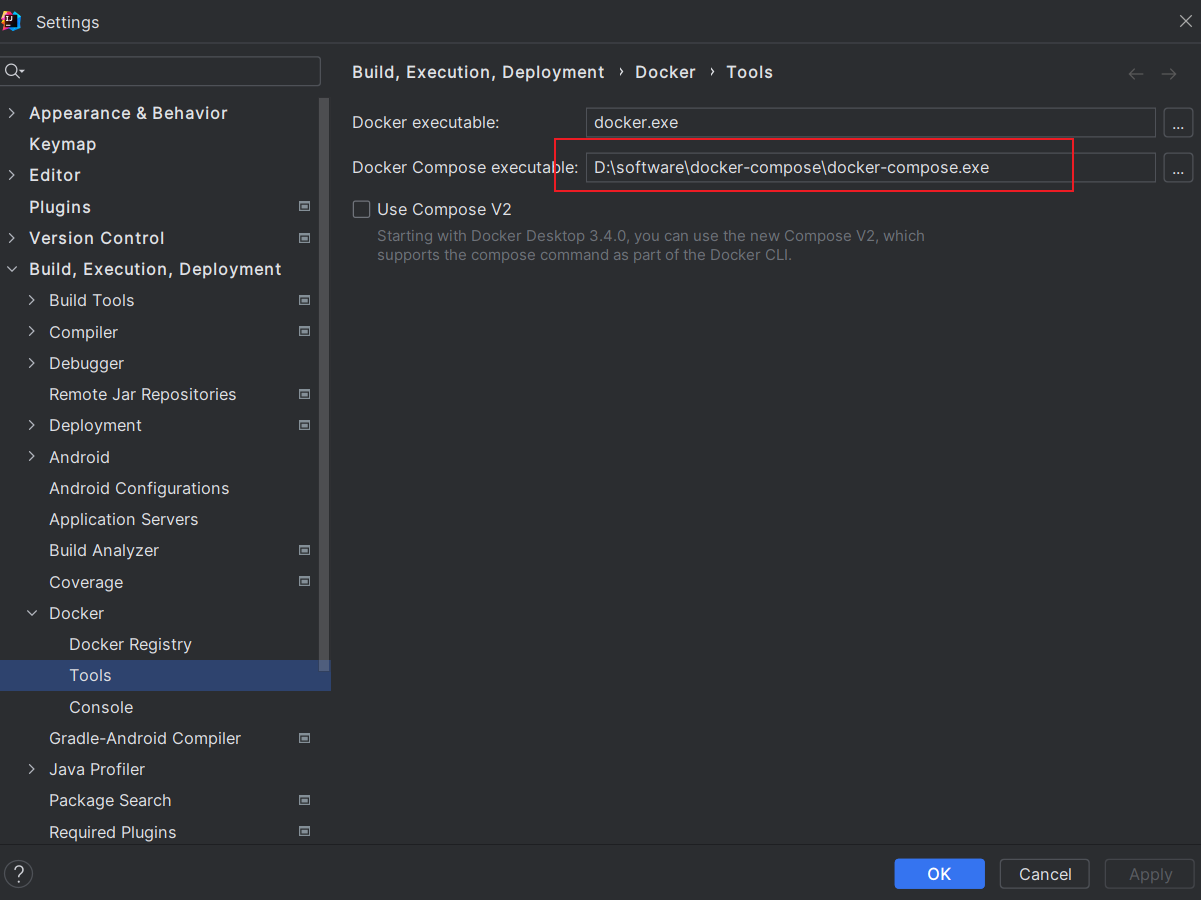
Download docker-compose
Just configure Docker Compose executable
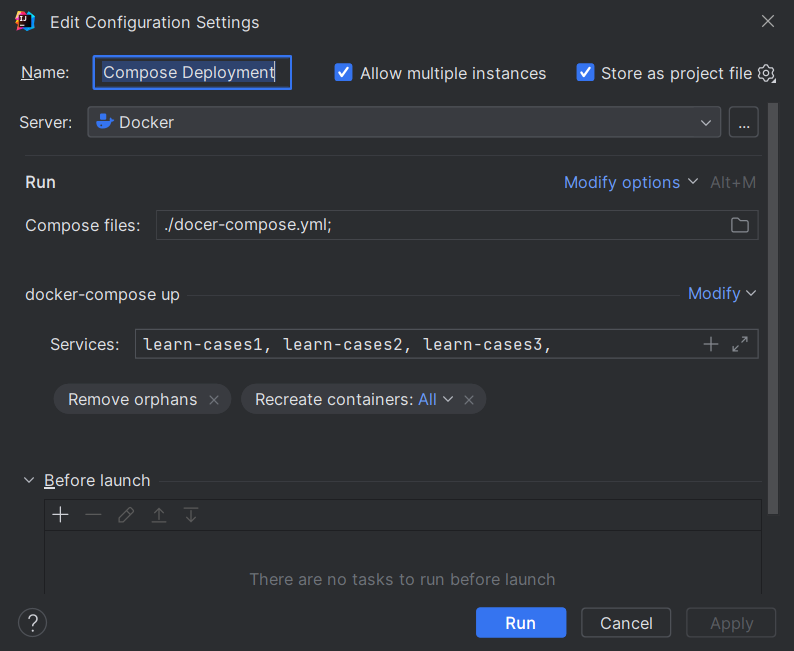
Note: When deploying, directly running may not start three containers. In this case, you can
downfirst and thendeploy.
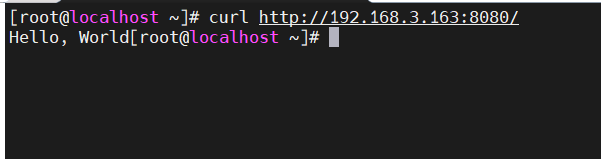
Access
192.168.3.163:8080
Agreement
The code part of this work is licensed under Apache License 2.0 . You may freely modify and redistribute the code, and use it for commercial purposes, provided that you comply with the license. However, you are required to:
- Attribution: Retain the original author's signature and code source information in the original and derivative code.
- Preserve License: Retain the Apache 2.0 license file in the original and derivative code.
- Attribution: Give appropriate credit, provide a link to the license, and indicate if changes were made.
- NonCommercial: You may not use the material for commercial purposes. For commercial use, please contact the author.
- ShareAlike: If you remix, transform, or build upon the material, you must distribute your contributions under the same license as the original.