Shell Basic Commands
Quickly Write to File
- Method 1
cat > a.txt << 'EOF'
afasdf
EOF
- Method 2
tee a.txt <<- 'EOF'
	afsafdsf
	EOF
Linux System Scheduled Network Time Synchronization
# Set scheduled task
crontab -e
*/5 * * * * ntpdate time.nist.gov

# View scheduled task list
crontab -l

# View scheduled task log
tail -f /var/log/cron

# Several time servers
ntpdate time.nist.gov
ntpdate time.nuri.net
ntpdate 0.asia.pool.ntp.org
ntpdate 1.asia.pool.ntp.org
ntpdate 2.asia.pool.ntp.org
ntpdate 3.asia.pool.ntp.org
crontab scheduled task parameter meaning
| Field | Mandatory | Allowed Values | Allowed Special Characters | Remarks |
|---|---|---|---|---|
| Seconds | Yes | 0–59 | *``,``- | Standard implementation does not support this field. |
| Minutes | Yes | 0–59 | *``,``- | |
| Hours | Yes | 0–23 | *``,``- | |
| Day of month | Yes | 1–31 | *``,``-``?``L``W | ?``L``W only partially implemented by software |
| Month | Yes | 1–12 or JAN–DEC | *``,``- | |
| Day of week | Yes | 0–7 or SUN–SAT | *``,``-``?``L``# | ?``L``# only partially implemented by software. Linux and Spring allow 0-7, 0 and 7 are Sunday. Quartz allows 1-7, 1 is Sunday |
| Year | No | 1970–2099 | *``,``- | Standard implementation does not support this field. |
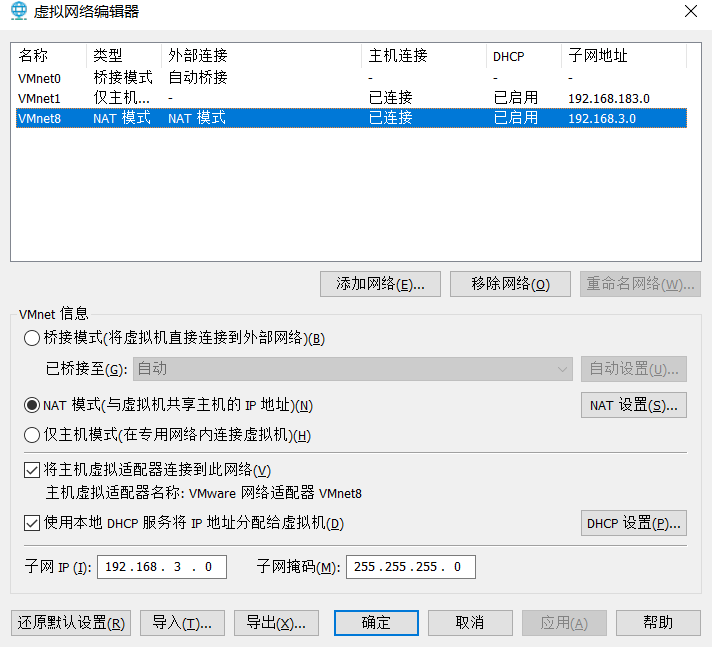
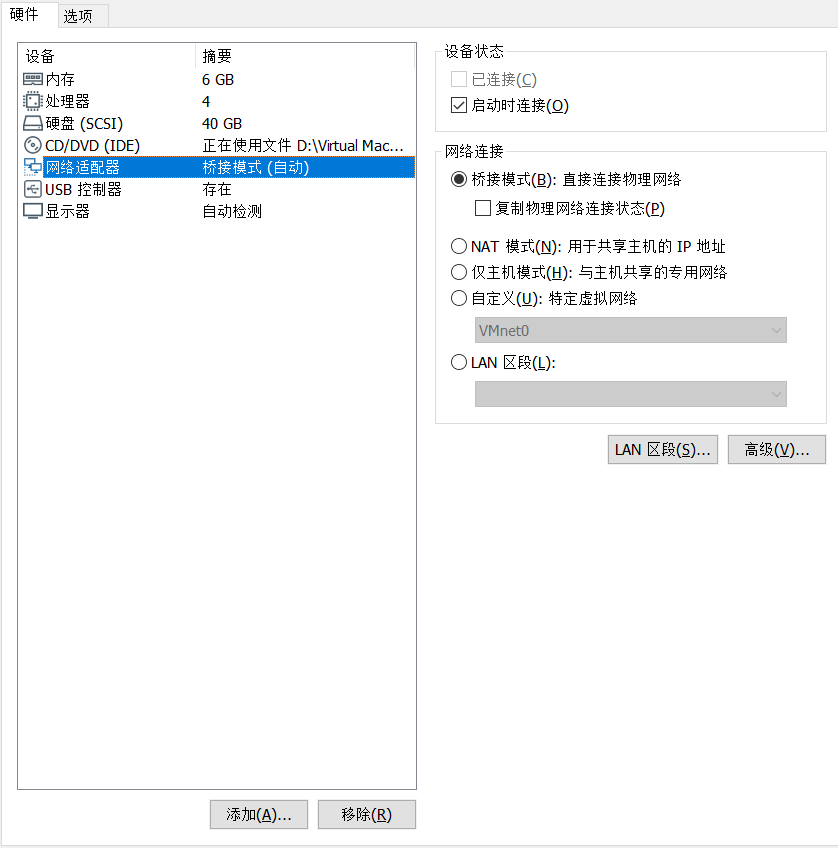
vmware Network Settings
Note best to use vmware 15, vmware 16 version seems to have network problems.
Query Total Size of Current Folder
du -sh ./
Query Directory Tree of First n Levels in Current Directory Structure
Show first level directory for /d %i in (*) do @echo %i
Install lrzsz
yum install -y lrzsz
sz download rz upload
Close Java Process in Linux
kill -9 $(ps -ef | grep -w "xxx-1.0.jar" | grep -v "grep" | awk '{print $2}')
grep Command
1️⃣ Basic Command
grep [options] PATTERN FILE
- Search for lines containing
PATTERNin file - Common options:
-i→ Ignore Case-v→ Invert Match (lines not containing PATTERN)-n→ Show Line Number-r/-R→ Recursive Search Directory-E→ Enable Extended Regular Expressions (ERE)
2️⃣ Basic Examples
2.1 Match Keyword
grep "error" logfile.txt
Match lines containing "error"
2.2 Ignore Case
grep -i "error" logfile.txt
Match "error", "Error", "ERROR" etc.
2.3 Show Line Number
grep -n "error" logfile.txt
Output Line Number + Line Content
2.4 Invert Match
# Output lines **not containing `error`**
grep -v "error" logfile.txt
# Records containing a but not b
awk '/a/ && !/b/' logfile.txt
grep "a" logfile.txt | grep -v "b"
2.5 Recursive Search Directory
grep -r "TODO" ./src
Search all files in src directory and subdirectories
3️⃣ grep -E Extended Regex
- Support more powerful regex syntax:
|→ OR+→ Previous character 1 or more times?→ Previous character 0 or 1 time()→ Grouping
- No need to use backslash escape like normal grep
3.1 Match Multiple Keywords
grep -E "error|fail|fatal" logfile.txt
Match "error", "fail" or "fatal"
3.2 Match Repeated Characters
echo -e "aaa\naa\nb" | grep -E "a+"
Match 1 or more consecutive a
Output:
aaa
aa
3.3 Optional Characters
echo -e "color\ncolour" | grep -E "colou?r"
u? → u can appear 0 or 1 time
Output:
color
colour
3.4 Group Matching
echo -e "cat\nbat\nrat" | grep -E "(c|b)at"
Match "cat" or "bat"
Output:
cat
bat
3.5 Line Number + Ignore Case
grep -Eni "error|fail" logfile.txt
-n→ Line Number-i→ Ignore Case-E→ Extended Regex
3.6 Complex Example
grep -E '(error|fail|fatal) [0-9]{3}' logfile.txt
Parse:
(error|fail|fatal)→ Matcherror,failorfatal[0-9]{3}→ Match three digits- Output entire matching line content
4️⃣ Match pip list Example (Combined with Extended Regex)
Assuming you have Python package list:
pip list | grep -E "sentence"
# Output:
# sentence-transformers                    5.1.0
If want to match sentence-transformers, use .* wildcard:
pip list | grep -E "sentence.*transformers"
5️⃣ Tips
- Pattern wrapped with single quotes
'...', avoid shell escape - Match entire word:
\bpattern\b - Match numbers:
[0-9]+ - Match any character:
. - Match repeated characters:
+/{n,m}
✅ Summary
grep→ Basic Searchgrep -E→ Extended Regex, supports|,+,?,()- Combinable options:
-i,-v,-n,-r - Common tips: Wrap with single quotes,
.*wildcard,[- ]match multiple separators
- Attribution: Retain the original author's signature and code source information in the original and derivative code.
- Preserve License: Retain the Apache 2.0 license file in the original and derivative code.
- Attribution: Give appropriate credit, provide a link to the license, and indicate if changes were made.
- NonCommercial: You may not use the material for commercial purposes. For commercial use, please contact the author.
- ShareAlike: If you remix, transform, or build upon the material, you must distribute your contributions under the same license as the original.